
Pricing · Buy on Freemius
Launch offer LAUNCH30: 30% off the first payment for new customers, until Nov 14, 2026 (up to 100 redemptions). The code is already applied to the Buy buttons below.
| Plan (1 website) | Regular price | Price with LAUNCH30 | |
|---|---|---|---|
| Starter Monthly |
≈ 130.000₫ |
$3.49 ≈ 91.000₫ |
Buy |
| Starter Yearly |
≈ 939.000₫ |
$25.20 ≈ 657.000₫ |
Buy |
| Starter Lifetime |
≈ 2.791.000₫ |
$74.90 ≈ 1.953.000₫ |
Buy |
| Pro Monthly |
≈ 261.000₫ |
$6.99 ≈ 182.000₫ |
Buy |
| Pro Yearly |
≈ 1.956.000₫ |
$52.50 ≈ 1.369.000₫ |
Buy |
| Pro Lifetime |
≈ 5.477.000₫ |
$147 ≈ 3.834.000₫ |
Buy |
- Payment in USD via Freemius (official reseller). VND prices are for reference only, converted at the Vietcombank selling rate on Oct 15, 2026: 26,080₫/USD.
- LAUNCH30 only discounts the first payment. Yearly plans renew at Starter $32.40/year and Pro $67.50/year; monthly plans renew at the regular price.
- Freemius emails your license automatically right after payment. 14-day money-back guarantee.
- Want to try it first? The Free version is available on WordPress.org.
Quick summary
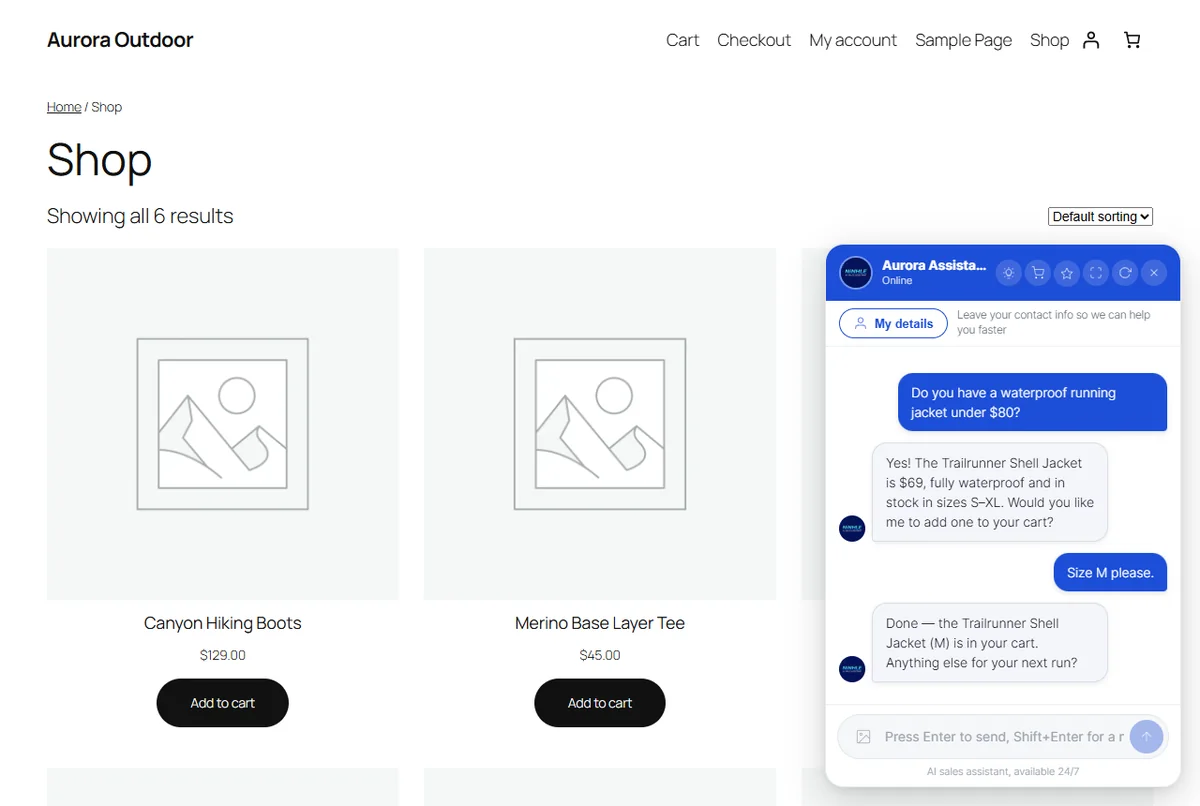
Ninhle AI Sales Assistant is an AI sales and customer-support assistant plugin for WordPress/WooCommerce. It answers shoppers 24/7 using your store’s real data (prices, stock, variations, policies), recommends products with add-to-cart links, captures leads and hands off to your staff when needed. You use your own OpenAI, Anthropic Claude or Google Gemini API key. Since version 2.7.0, shoppers can see shipping, totals and check out right from the chat. Current version: 2.7.0 (02/11/2026).
- Free version on WordPress.org, with no time limit.
- Starter from $4.99/month, Pro $9.99/month or $75/year; 14-day Pro trial; 14-day money-back guarantee.
- Each license covers 1 website. Pay by card or PayPal via Freemius.
What’s new in version 2.7.0
Version 2.7.0 helps you close orders right inside the chat: shoppers see real shipping costs and totals, get a payment link, and on the Starter plan can place bank-transfer or COD orders without leaving the conversation.
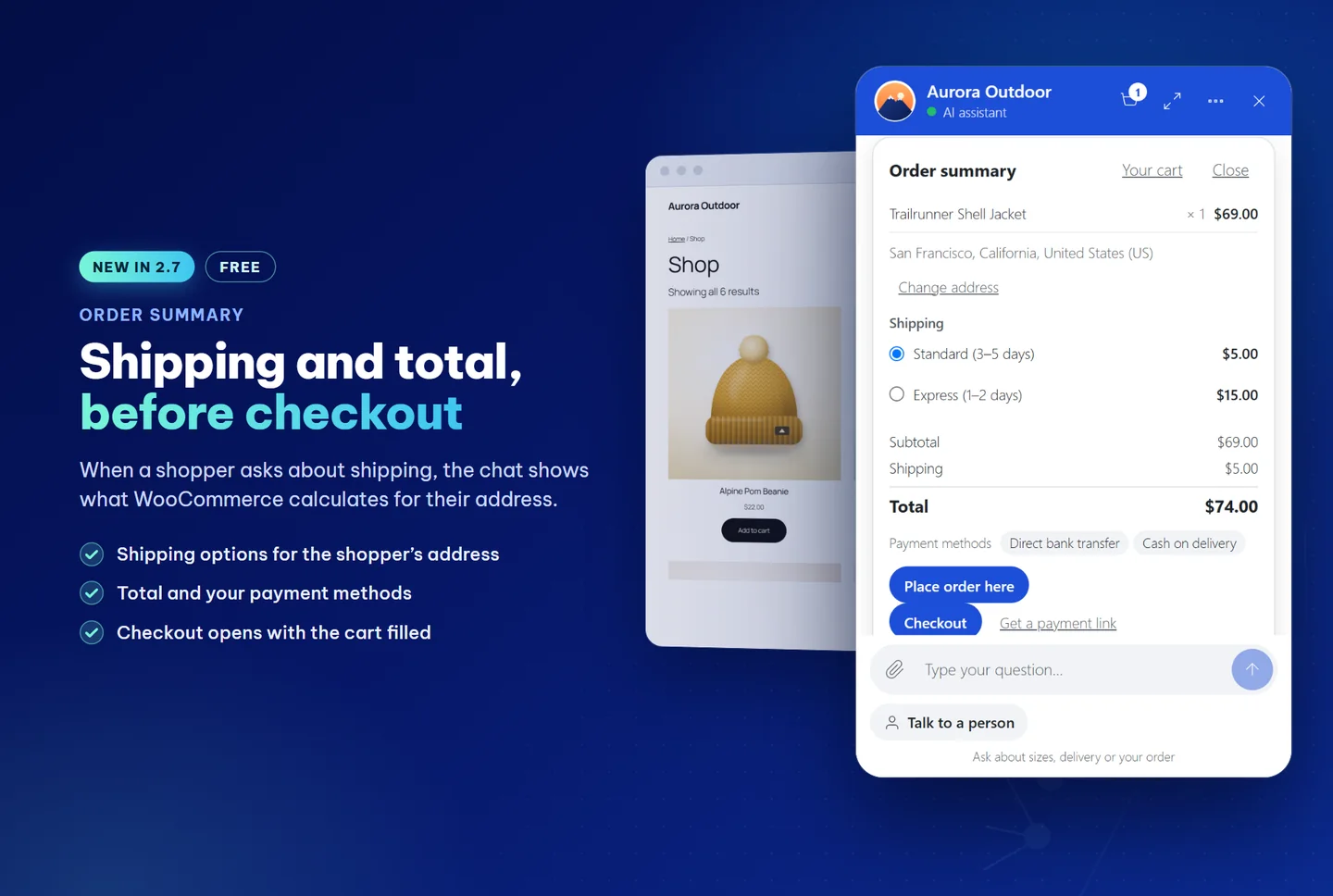
1. Shipping and total before checkout (all plans)
- Order summary: products, shipping options for the shopper’s address, tax, total and your store’s payment methods, all calculated by WooCommerce itself.
- The Checkout button opens your store’s checkout with the cart pre-filled. No order is placed from the card unless the shopper clicks.
- On mobile: full-screen chat, one-tap checkout.
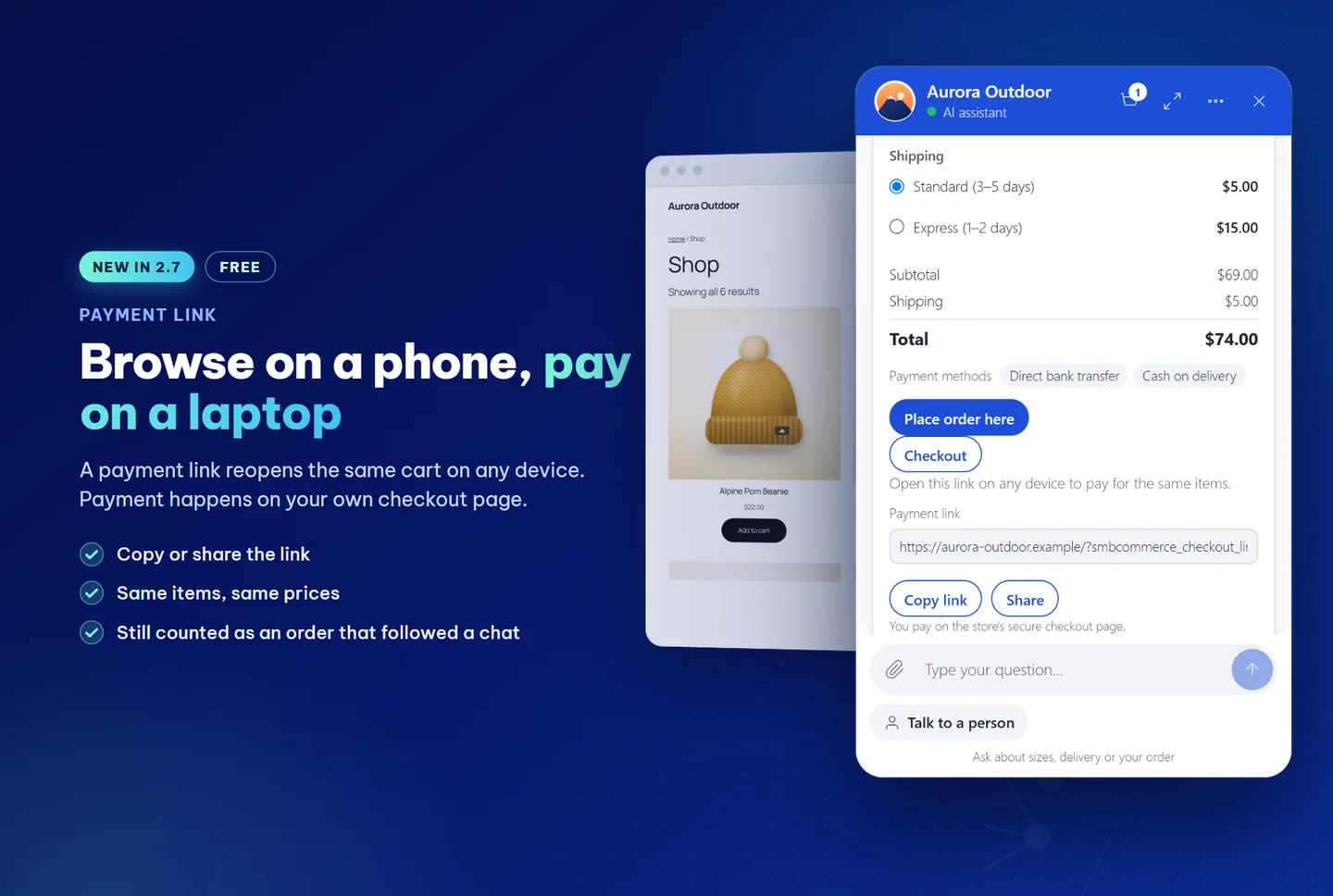
2. Payment link (all plans)
- “Get a payment link” reopens the exact same cart and prices on another device: browse on the phone, pay on the laptop.
- The assistant can show a “Checkout with these items” button. Orders placed through the link still count as post-chat orders.
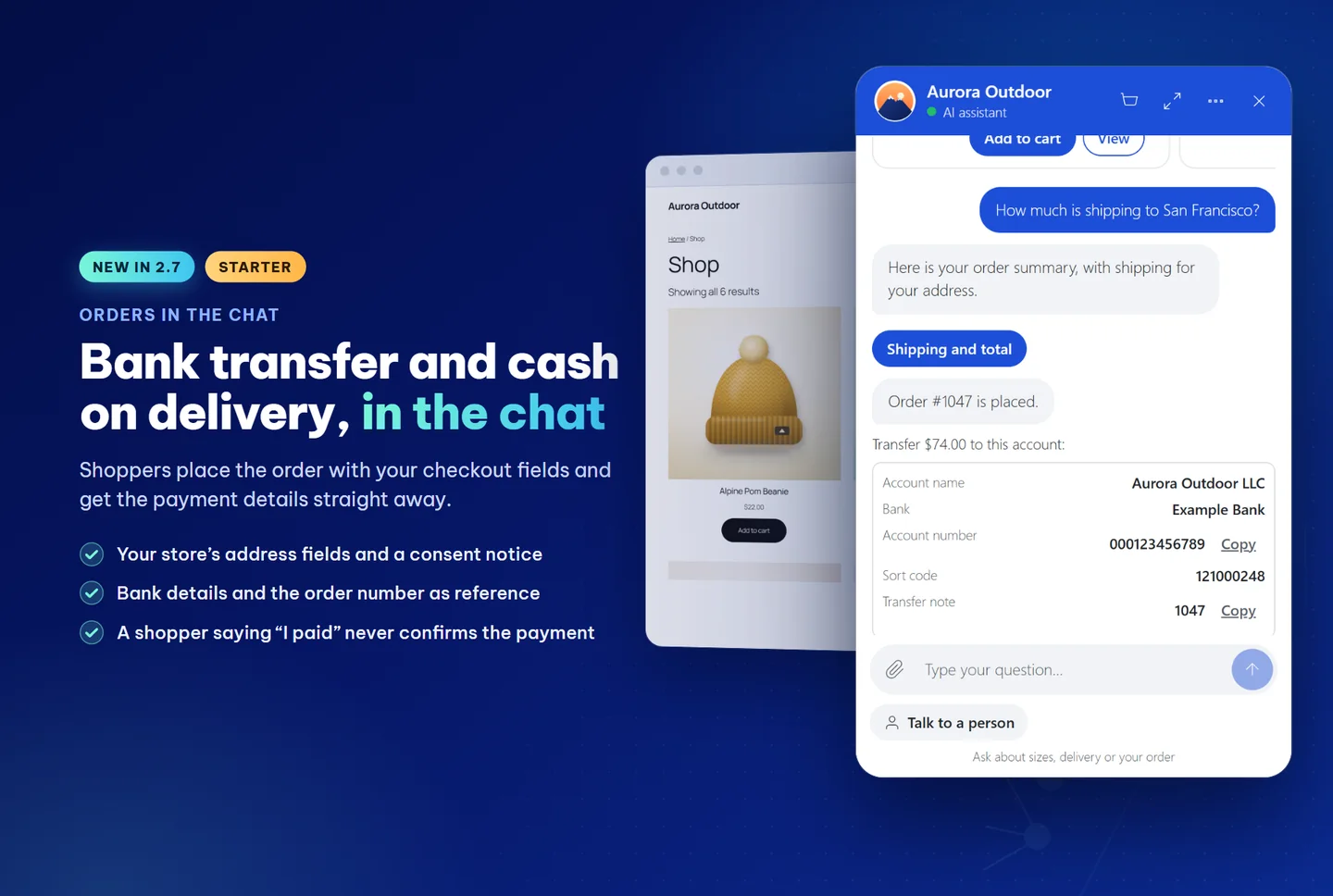
3. Bank transfer, COD and VietQR orders in the chat (Starter)
- Shoppers order using your store’s own address fields, with a consent notice; right after ordering they get the account number, amount and the order number as the transfer reference.
- VietQR codes for VND bank-transfer orders, generated right on your website.
- The chat confirms “payment received” once the order is paid. A shopper saying “I’ve paid” or sending a screenshot never auto-confirms: the system opens a check request for staff in the Inbox.
- Optional shipped, delivered and delivery-problem notices in the chat and by email (off by default).
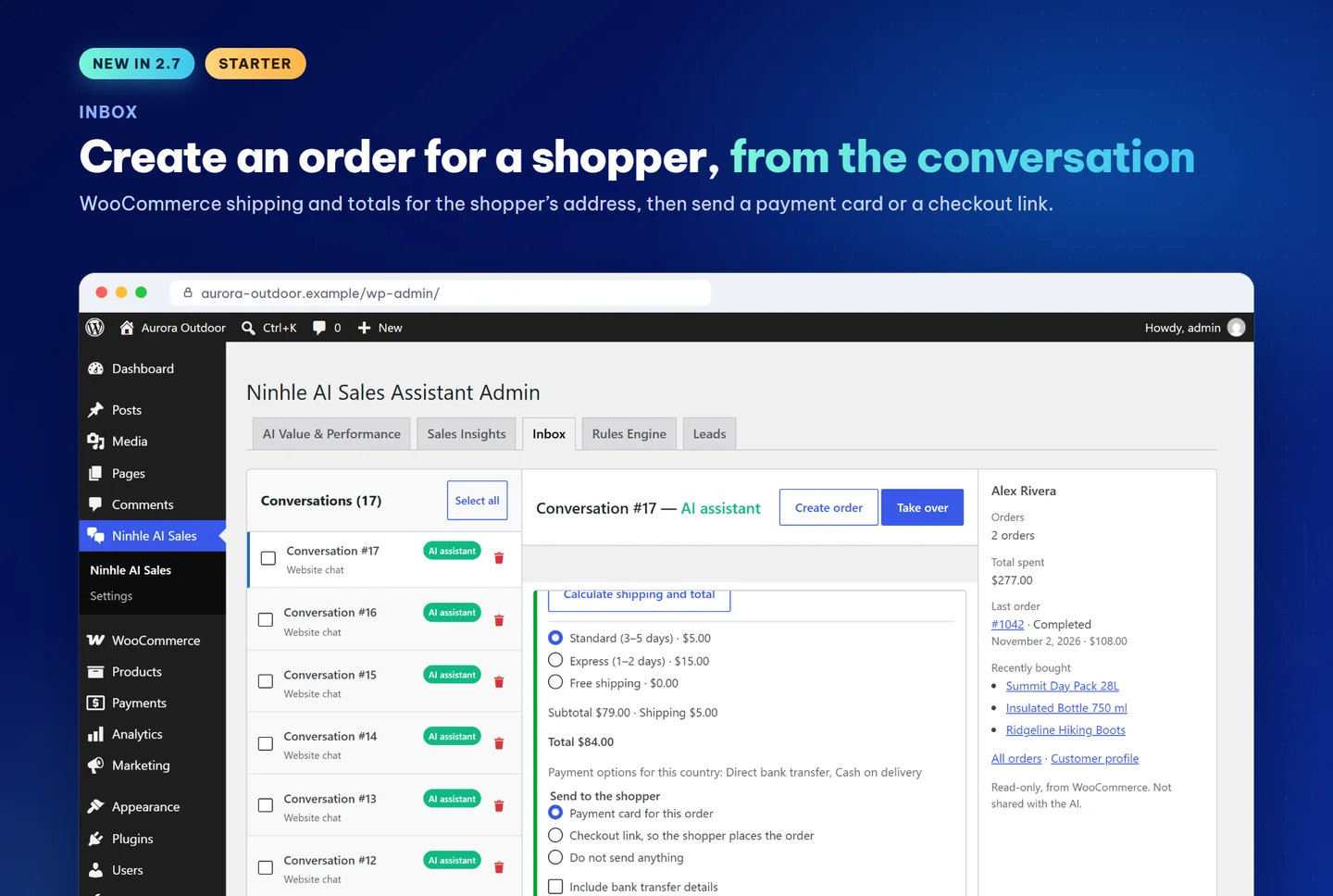
4. Create orders for shoppers from the Inbox (Starter)
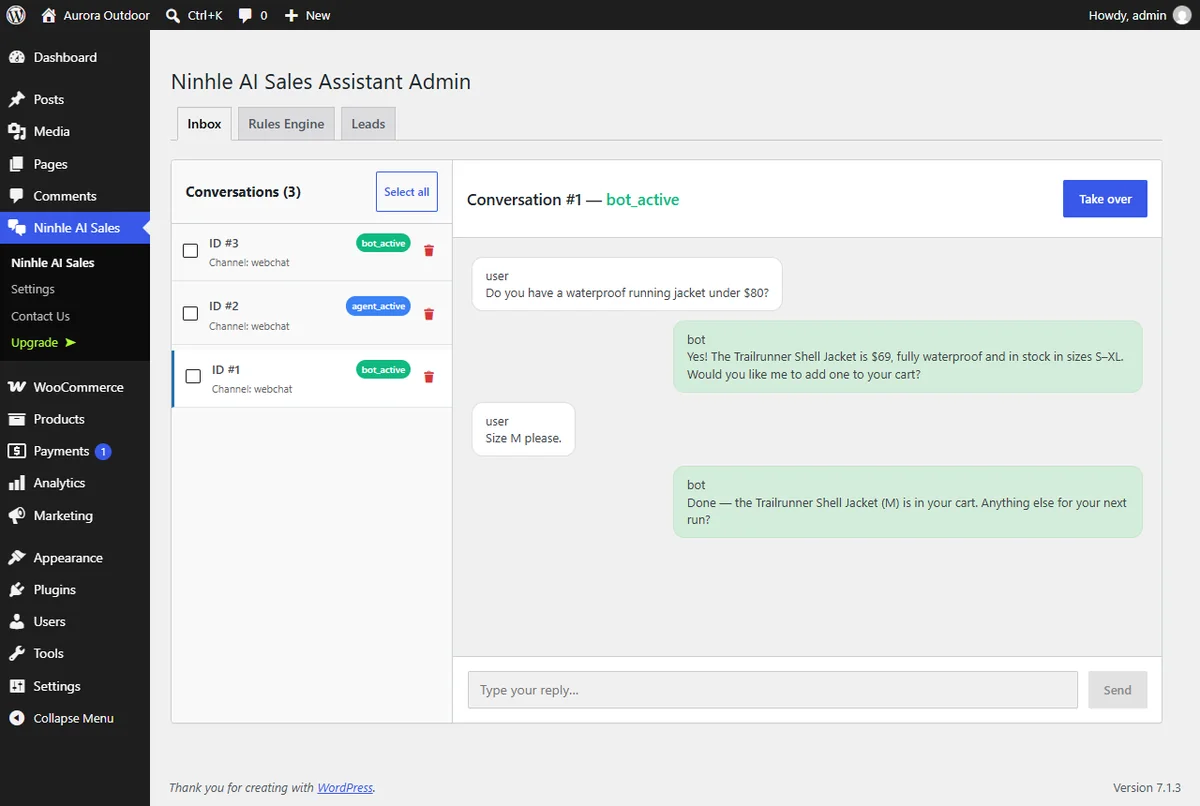
- Staff click Create order, WooCommerce calculates shipping and total for the shopper’s address, then a payment card or checkout link is sent into the conversation.
- A customer card on the side: order count, total spent, latest order, purchased products; visible to staff only, never sent to the AI.
5. Order tracking, webhooks and AI agents
- Order cards pull tracking numbers from AfterShip, ParcelPanel, Trakoo, YITH Order Tracking and delivery status from TrackShip (all plans).
- Signed webhooks (Standard Webhooks, automatic retries, delivery log) are now available on the Starter; plus cart, checkout, order and shipping events.
- Pro: sales capabilities for your own AI agent (WordPress 6.9+ and MCP Adapter) with draft replies for staff approval; order payment methods by country or customer group.
Versions 2.6.0 and 2.5.0
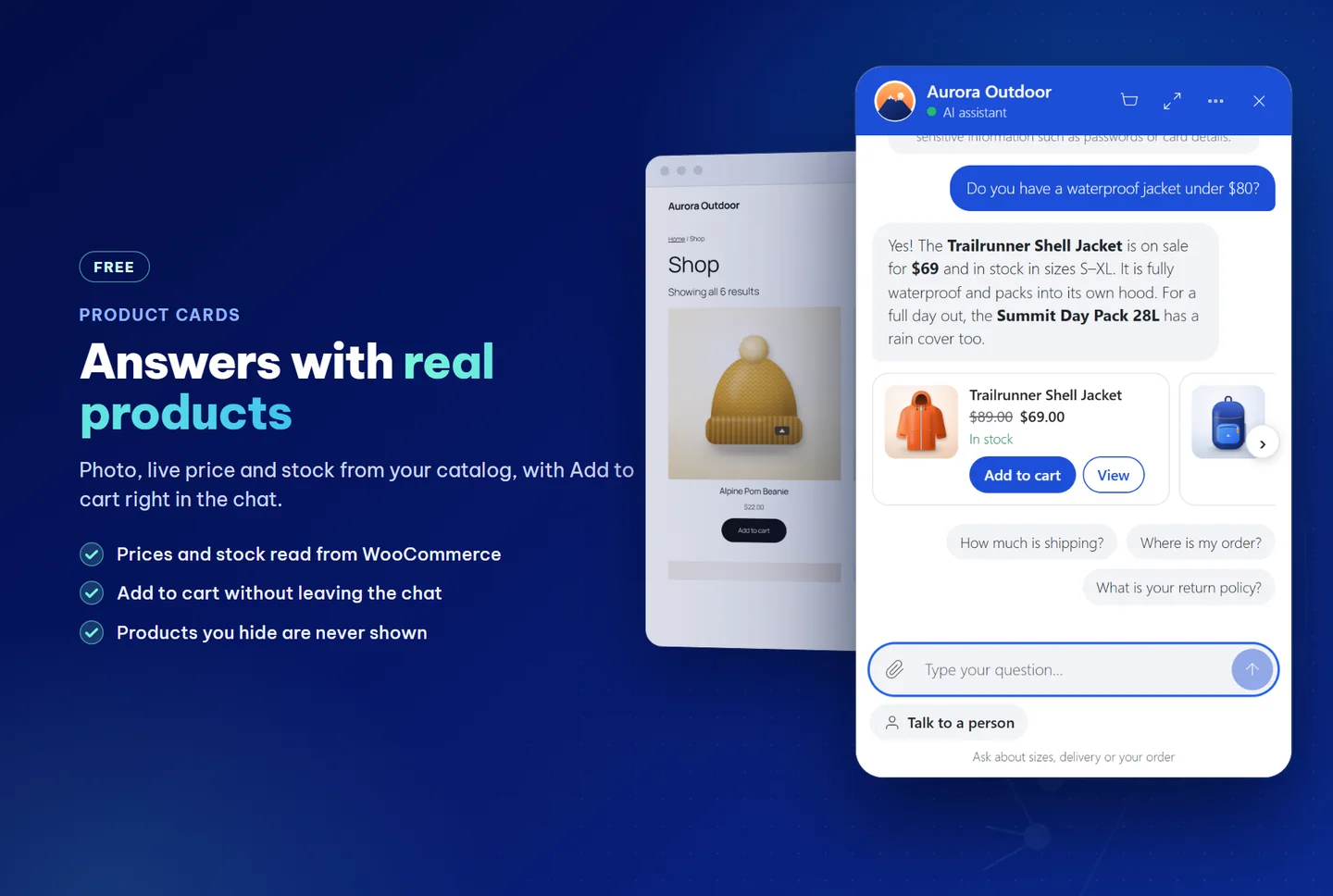
- 2.6.0: product cards with image, price, stock and Add to cart button; order tracking cards with tracking numbers; replies in the shopper’s language; Sales Insights tab (unanswered questions, searches with no results, out-of-stock products people ask about).
- 2.5.0: well-formatted answers (bold, lists, tables, product images) and voice input (optional, off by default; the plugin never stores audio).
Key features
- Answers from real data: finds products, shows details, prices by size/color, stock and policies; looks up orders only after the shopper proves they own the order. When data is missing, it says so and offers a human handoff.
- Sells, not just chats: editable sales playbook (role, discovery questions, objection handling, closing) plus product links and add to cart right in the chat.
- Measure AI value: the AI Value & Performance tab shows AI costs, AI-assisted orders and the outcome of each conversation, always with sample size.
- A real person is always available: the “Talk to a human” button is always visible; staff reply from the Inbox, click Take over, then hand back to the assistant.
- Lead capture: name, email and phone stored in your WordPress database, CSV export that opens straight in Excel.
- Rules Engine: keyword rules to auto-handoff to staff, send after-hours greetings and add tags.
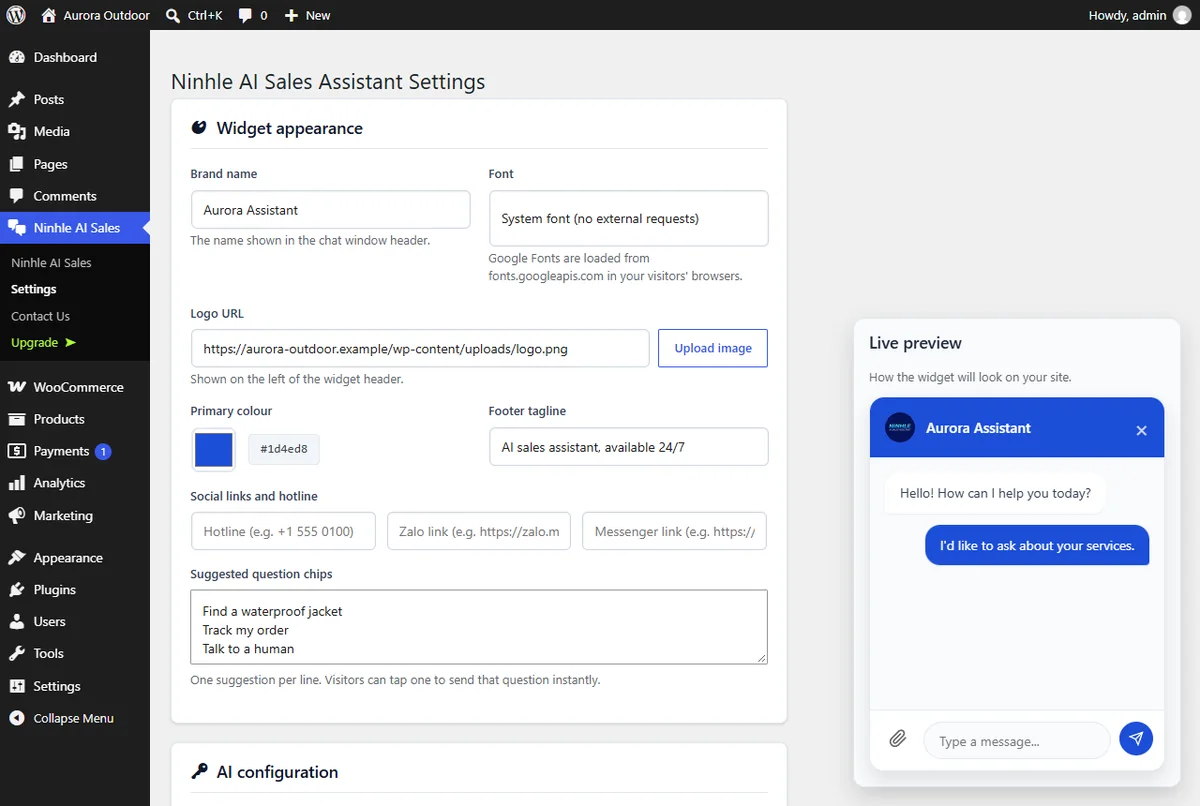
- On-brand: assistant name, logo, colors, font, tagline and suggested questions; add Messenger, Zalo, WhatsApp, Telegram and phone buttons.
- Reads images, PDFs and screenshots sent by shoppers.
- Local-only mode: answers product, cart and order questions without calling AI.
How do Free, Starter and Pro differ?
| Plan | What you get |
|---|---|
| Free ($0) | AI sales chat, well-formatted answers, voice input, answers from store data, playbook & Rules, lead capture + CSV, human handoff & Inbox, AI value tracking, widget customization, local-only; from 2.6–2.7: product cards with Add to cart, order tracking, shipping and total in chat, payment link. |
| Starter | Everything in Free, plus product variations, Telegram notifications, sales dashboard, answer caching, AI-assisted order revenue by currency; new in 2.7: bank transfer/COD and VietQR orders in chat, create orders from the Inbox, payment-received notices, shipping updates, signed webhooks. |
| Pro | Everything in Starter, plus automatic fallback AI provider, daily/monthly AI budget caps, coupon checks, lead scoring, price checks in answers; new in 2.7: sales capabilities for your own AI agent (MCP), payment-method order by country/customer group. |
Full comparison and current coupons: ninhle.com/smbai.
How it works
- Shoppers ask questions in the chat, by typing or speaking.
- The assistant looks up store data: products, prices, stock, orders, policies.
- The assistant replies concisely (with tables and product images when useful), recommends products with add-to-cart links and collects contact details.
- It hands off to staff when a shopper complains, asks for a person, or the assistant isn’t confident enough.
System requirements
| Component | Requirement |
|---|---|
| WordPress | 6.3 or later |
| PHP | 8.1 or later |
| WooCommerce | Required for product advice, cart and order lookup (supports HPOS, Cart & Checkout blocks); chat and lead capture work on any WordPress site |
| AI | OpenAI, Anthropic Claude or Google Gemini API key (or local-only mode) |
| Voice input | HTTPS website; shoppers use Chrome, Edge or Safari |
Setup in 4 steps
- Install the Free version from WordPress.org (Plugins → Add New → search “Ninhle AI Sales Assistant”). For a paid plan, install the Premium version from your Freemius email and enter the license.
- Go to Ninhle AI Sales → Settings, enter your API key (or choose local-only).
- Fill in your real store info (hours, shipping, returns) and review the sales playbook. To let shoppers speak instead of type, enable “Let visitors speak their message”.
- Click Sync products now and try asking like a customer.
Security and privacy
- API keys are encrypted, stored server-side and never sent to the browser.
- Conversations, customers and leads are stored in your WordPress database; supports WordPress personal data Export/Erase tools.
- Per-session message rate limits; messages render as DOM elements, and only http/https links are clickable.
- Voice input: the plugin never receives, records or stores audio.
Frequently asked questions
What is Ninhle AI Sales Assistant?
A WordPress plugin that turns the chat on your WooCommerce site into a 24/7 AI sales advisor: it answers with your store’s real prices, stock and policies, recommends products with add-to-cart links, captures shopper details and hands off to staff when needed.
What’s new in version 2.7.0?
Version 2.7.0 (Nov 2, 2026) lets shoppers see WooCommerce-calculated shipping, tax and totals right in the chat, get a payment link that opens on another device, and adds tracking numbers from AfterShip, ParcelPanel, Trakoo, YITH and TrackShip. The Starter plan adds bank transfer/COD and VietQR orders in chat, payment-received notices, creating orders from the Inbox and signed webhooks. The earlier 2.6.0 added product cards with Add to cart, order tracking cards and replies in the shopper’s language.
Can shoppers pay by card right inside the chat?
No. Card and e-wallet payments always happen on your store’s checkout page through your existing payment gateway; the chat only pre-calculates shipping and totals and opens checkout with the cart filled in. The Starter plan allows bank-transfer or COD orders right in the chat.
Does voice input cost extra?
No. The browser handles speech recognition; the plugin doesn’t call any paid service for this.
Does voice input support Vietnamese?
Yes, when the browser supports Vietnamese recognition (recent Chrome, Edge, Safari). The recognition language follows your website’s language. The mic button only appears on https pages; Firefox isn’t supported yet.
Does the plugin record shoppers’ voices?
No. The plugin never receives, records or stores audio, only the text the shopper chooses to send. Depending on the browser, audio may be sent to the browser vendor’s recognition service (Google for Chrome, Apple for Safari, Microsoft for Edge).
Are AI costs included in the plan price?
No. You use your own OpenAI, Anthropic Claude or Google Gemini API key and pay the provider directly. In an internal test of 60 conversations with GPT-4o mini, the cost was about $0.0006 per conversation; larger models cost more. Local-only mode needs no key.
Does the assistant make up prices or stock?
No. Product info comes from lookups in your store; if data is missing, the assistant says so and offers a human handoff. The Pro plan also double-checks prices in its answers.
Will upgrading from an older version lose data?
No. Upgrades from 2.4.1 were tested: conversations, leads, rules, settings and AI Value data stay intact, and the database structure is unchanged.
Can I try it before buying?
Yes. The Free version on WordPress.org has no time limit; the Pro plan has a 14-day trial and every paid plan has a 14-day money-back guarantee.
How are Ninhle AI Sales Assistant and Nexus Sale related?
They are the same product. Since version 2.3.0, Nexus Sale has been renamed Ninhle AI Sales Assistant.
Get started
Install the Free version on WordPress.org to try it with your store, or pick a plan in the pricing table above. See full details, feature comparison and the partner program (30% commission) at ninhle.com/smbai. ninhle.com itself runs the Pro version: open the chat in the corner of the screen to try it.
Note: real results depend on your product data, the policies you enter, the AI model and your team’s workflow. The plugin doesn’t guarantee any specific revenue or conversion rate. Updated Oct 23, 2026.
{“@context”:”https://schema.org”,”@type”:”FAQPage”,”mainEntity”:[{“@type”:”Question”,”name”:”What is Ninhle AI Sales Assistant?”,”acceptedAnswer”:{“@type”:”Answer”,”text”:”A WordPress plugin that turns the chat on your WooCommerce site into a 24/7 AI sales advisor: it answers with your store’s real prices, stock and policies, recommends products with add-to-cart links, captures shopper details and hands off to staff when needed.”}},{“@type”:”Question”,”name”:”What’s new in version 2.7.0?”,”acceptedAnswer”:{“@type”:”Answer”,”text”:”Bản 2.7.0 (02/11/2026) cho khách xem phí ship, thuế và tổng tiền do WooCommerce tính ngay trong chat, nhận link thanh toán mở trên thiết bị khác, và thêm mã vận đơn từ AfterShip, ParcelPanel, Trakoo, YITH, TrackShip. Gói Starter có đặt đơn chuyển khoản/COD và mã VietQR trong chat, báo đã nhận tiền, tạo đơn cho khách từ Inbox và webhook có chữ ký.”}},{“@type”:”Question”,”name”:”Can shoppers pay by card right inside the chat?”,”acceptedAnswer”:{“@type”:”Answer”,”text”:”No. Card and e-wallet payments always happen on your store’s checkout page through your existing payment gateway; the chat only pre-calculates shipping and totals and opens checkout with the cart filled in. The Starter plan allows bank-transfer or COD orders right in the chat.”}},{“@type”:”Question”,”name”:”Does voice input cost extra?”,”acceptedAnswer”:{“@type”:”Answer”,”text”:”No. The browser handles speech recognition; the plugin doesn’t call any paid service for this.”}},{“@type”:”Question”,”name”:”Does voice input support Vietnamese?”,”acceptedAnswer”:{“@type”:”Answer”,”text”:”Yes, when the browser supports Vietnamese recognition (recent Chrome, Edge, Safari). The recognition language follows your website’s language. The mic button only appears on https pages; Firefox isn’t supported yet.”}},{“@type”:”Question”,”name”:”Does the plugin record shoppers’ voices?”,”acceptedAnswer”:{“@type”:”Answer”,”text”:”No. The plugin never receives, records or stores audio, only the text the shopper chooses to send. Depending on the browser, audio may be sent to the browser vendor’s recognition service (Google for Chrome, Apple for Safari, Microsoft for Edge).”}},{“@type”:”Question”,”name”:”Are AI costs included in the plan price?”,”acceptedAnswer”:{“@type”:”Answer”,”text”:”No. You use your own OpenAI, Anthropic Claude or Google Gemini API key and pay the provider directly. In an internal test of 60 conversations with GPT-4o mini, the cost was about $0.0006 per conversation; larger models cost more. Local-only mode needs no key.”}},{“@type”:”Question”,”name”:”Does the assistant make up prices or stock?”,”acceptedAnswer”:{“@type”:”Answer”,”text”:”No. Product info comes from lookups in your store; if data is missing, the assistant says so and offers a human handoff. The Pro plan also double-checks prices in its answers.”}},{“@type”:”Question”,”name”:”Will upgrading from an older version lose data?”,”acceptedAnswer”:{“@type”:”Answer”,”text”:”No. Upgrades from 2.4.1 were tested: conversations, leads, rules, settings and AI Value data stay intact, and the database structure is unchanged.”}},{“@type”:”Question”,”name”:”Can I try it before buying?”,”acceptedAnswer”:{“@type”:”Answer”,”text”:”Yes. The Free version on WordPress.org has no time limit; the Pro plan has a 14-day trial and every paid plan has a 14-day money-back guarantee.”}},{“@type”:”Question”,”name”:”How are Ninhle AI Sales Assistant and Nexus Sale related?”,”acceptedAnswer”:{“@type”:”Answer”,”text”:”They are the same product. Since version 2.3.0, Nexus Sale has been renamed Ninhle AI Sales Assistant.”}}]}

Reviews
There are no reviews yet.