
An AI sales assistant that advises & closes 24/7 on WooCommerce
Ninhle AI Sales Assistant is an AI sales and customer support assistant for WooCommerce that answers from your real store data, recommends the right products, captures leads and hands off to your team.
- 24/7 answers from real prices, stock and policies
- OpenAI, Claude or Gemini with your own key
- Measure AI cost and AI-assisted orders
- Lead capture, inbox and an always-visible “Talk to a person” button
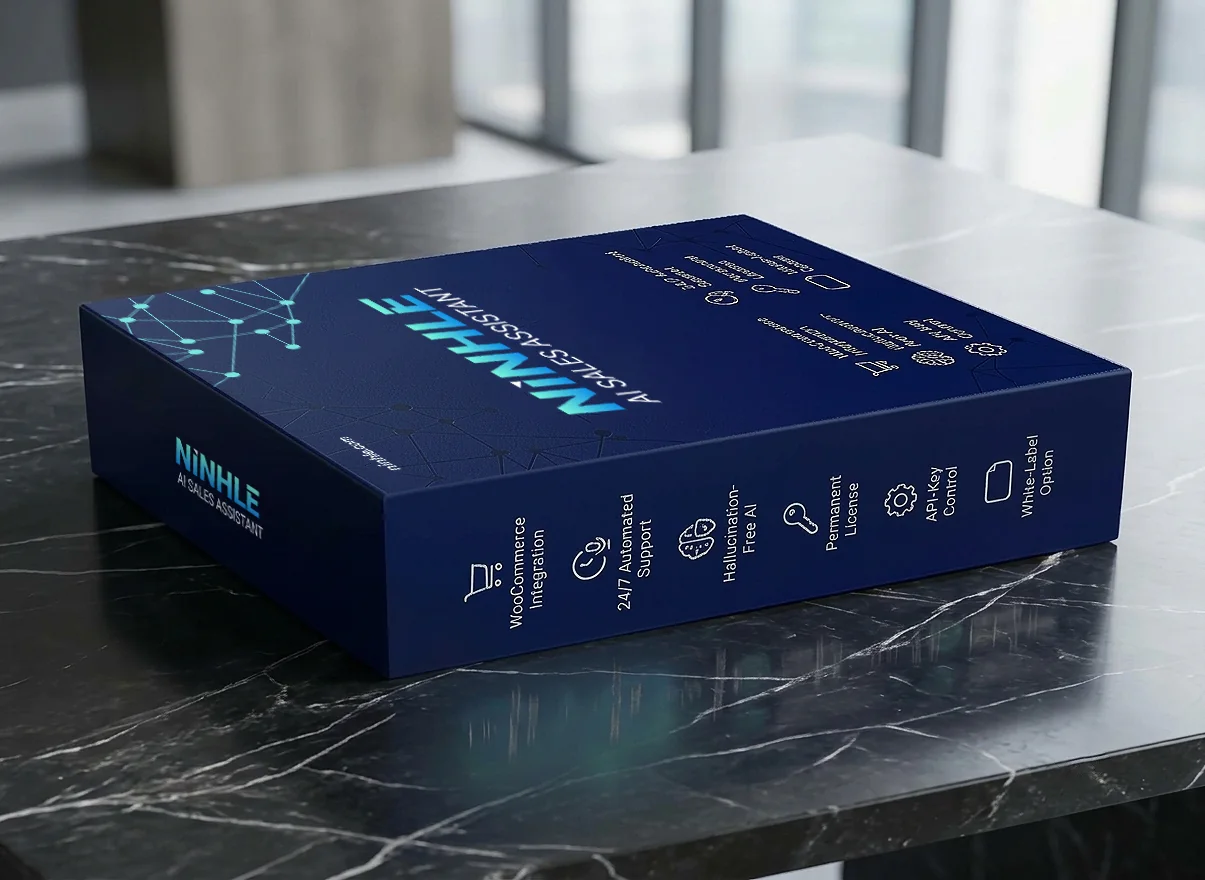
Everything you need to know in 30 seconds
Close the sale right in the chat
Earlier releases: 2.6.0 · 2.5.0 · 2.4.1 · 2.4.0
2.6.0 – Add to cart and order lookup in the chat
- Product cards with photo, price, stock, rating and an Add to cart button; a cart view with subtotal and Checkout.
- Order tracking cards: status, items, total, tracking number and a Track link; logged-in customers see recent orders without an email address.
- Sales Insights tab: unanswered questions (with “Add answer”), searches with no matching product, out-of-stock products shoppers wanted.
- Replies in the shopper’s language (15 languages).
- Starter: options, quantities and discount codes on cards; a customer card in the Inbox; labels for why chats did not lead to an order.
2.5.0 – Clean answers and voice input: bold text, lists, tables and product images display cleanly; visitors can speak instead of type (optional). See.
2.4.1 – Affiliate program: apply to become a referral partner right inside WordPress and earn 30% commission. See how.
2.4.0 – Measurable AI value
- AI Value & Performance tab: AI cost recorded per request, AI-assisted orders and how each conversation ended, always with sample sizes. Revenue per currency on Starter and Pro.
- New widget: an always-visible “Talk to a person” button, a clear AI or human status, full screen on phones, plus WhatsApp and Telegram.
- Correct prices for products with sizes or colours, in your store’s currency.
- No invented policies: if your shipping or returns terms are not set, the assistant offers to check with your team.
- Pro: automatic failover to a backup AI provider when OpenAI reports a bad key, an exhausted quota or an outage.
A sales rep that never clocks out
An AI sales agent that works 24/7 on your website. Unlike scripted chatbots, it looks up your WooCommerce catalog and store while it chats, so answers about products, prices and stock come from real data.
When the data is missing, it says so and offers a human handoff instead of guessing.
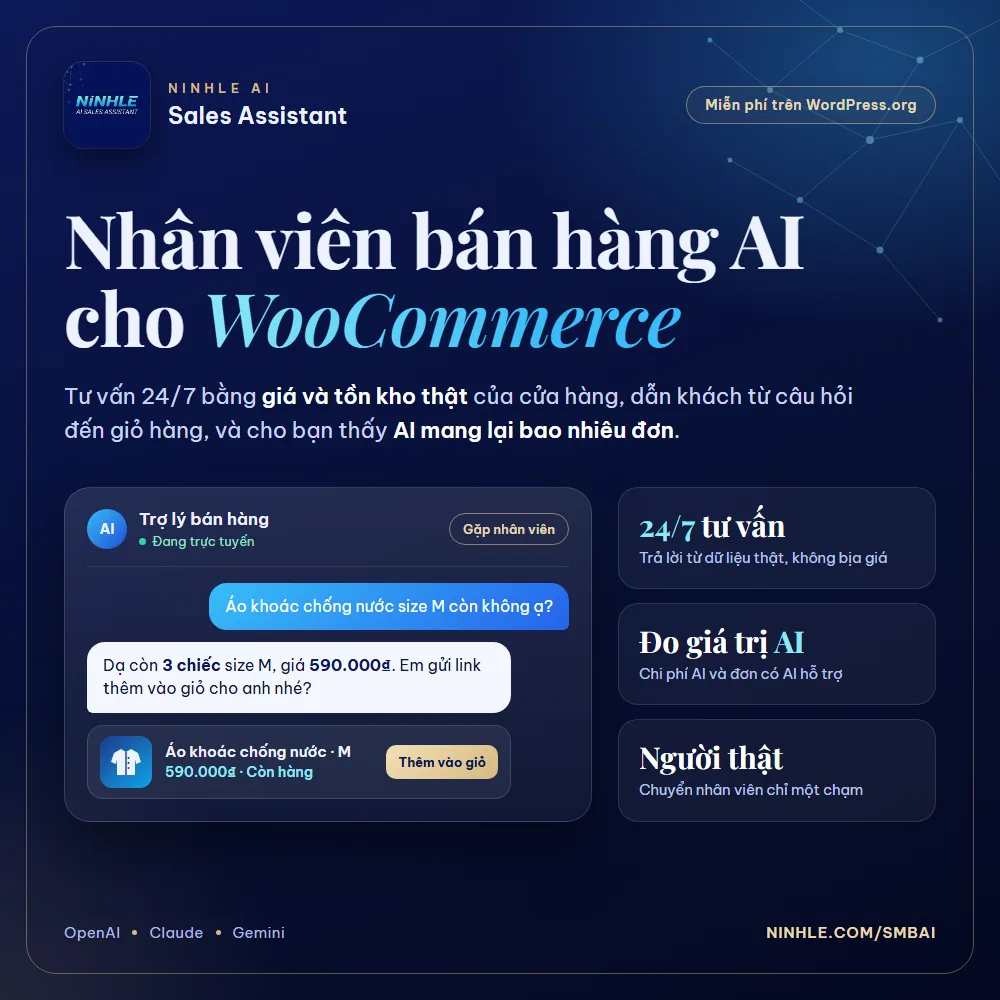
Every unanswered question is a sale walking away
After-hours answers
Shoppers get instant answers outside business hours.
No more repeat questions
Repeated questions (price, size, shipping, returns) are handled automatically.
Guided to purchase
Shoppers are guided from question to purchase: needs, the right product, objections.
No lost leads
Leads are saved and you are notified.
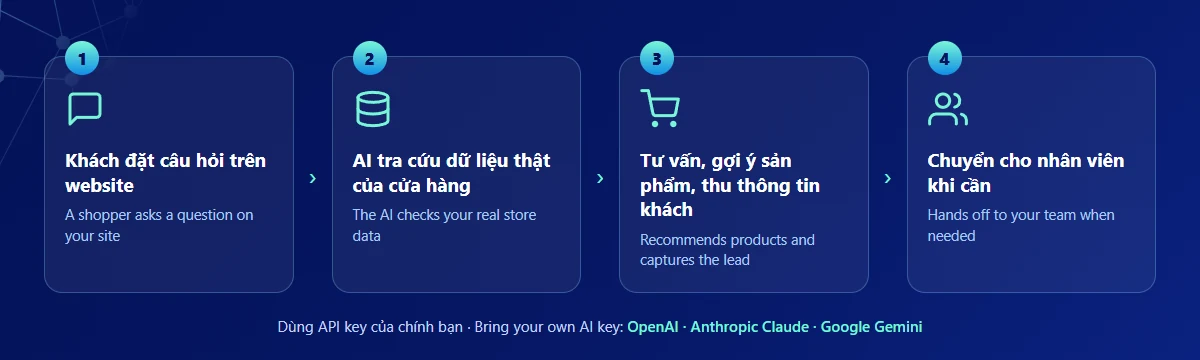
From question to order in 4 steps
- A shopper asks in the chat.
- The assistant checks your store data: products, prices, stock, orders, policies.
- It advises, recommends products with add-to-cart links and captures the lead.
- It hands off to a person on complaints, explicit requests or low confidence.
From advice to checkout, right inside the chat
Every price, stock level, shipping fee and order detail is read from WooCommerce, never guessed by the AI.
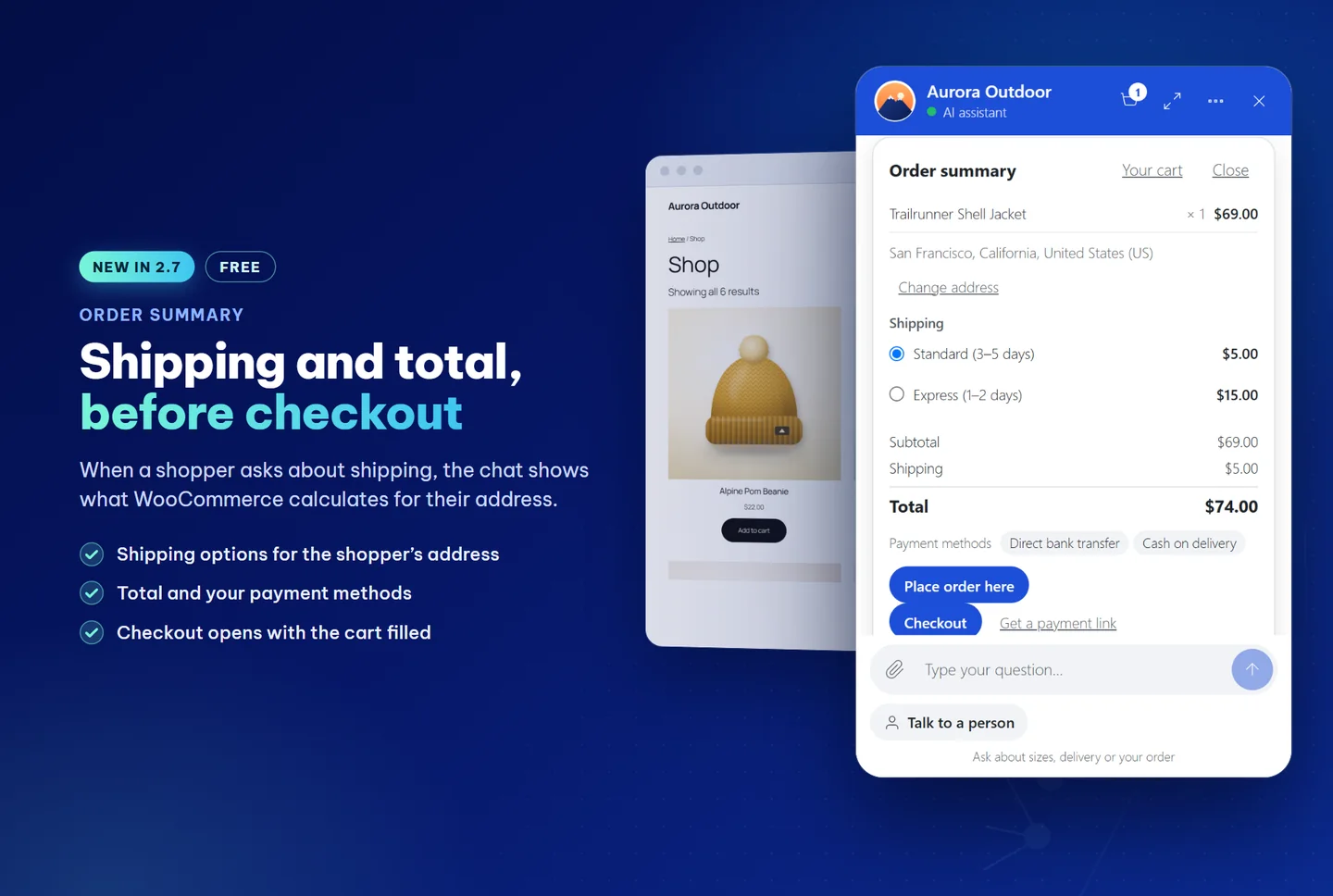
Shipping and total, before checkout
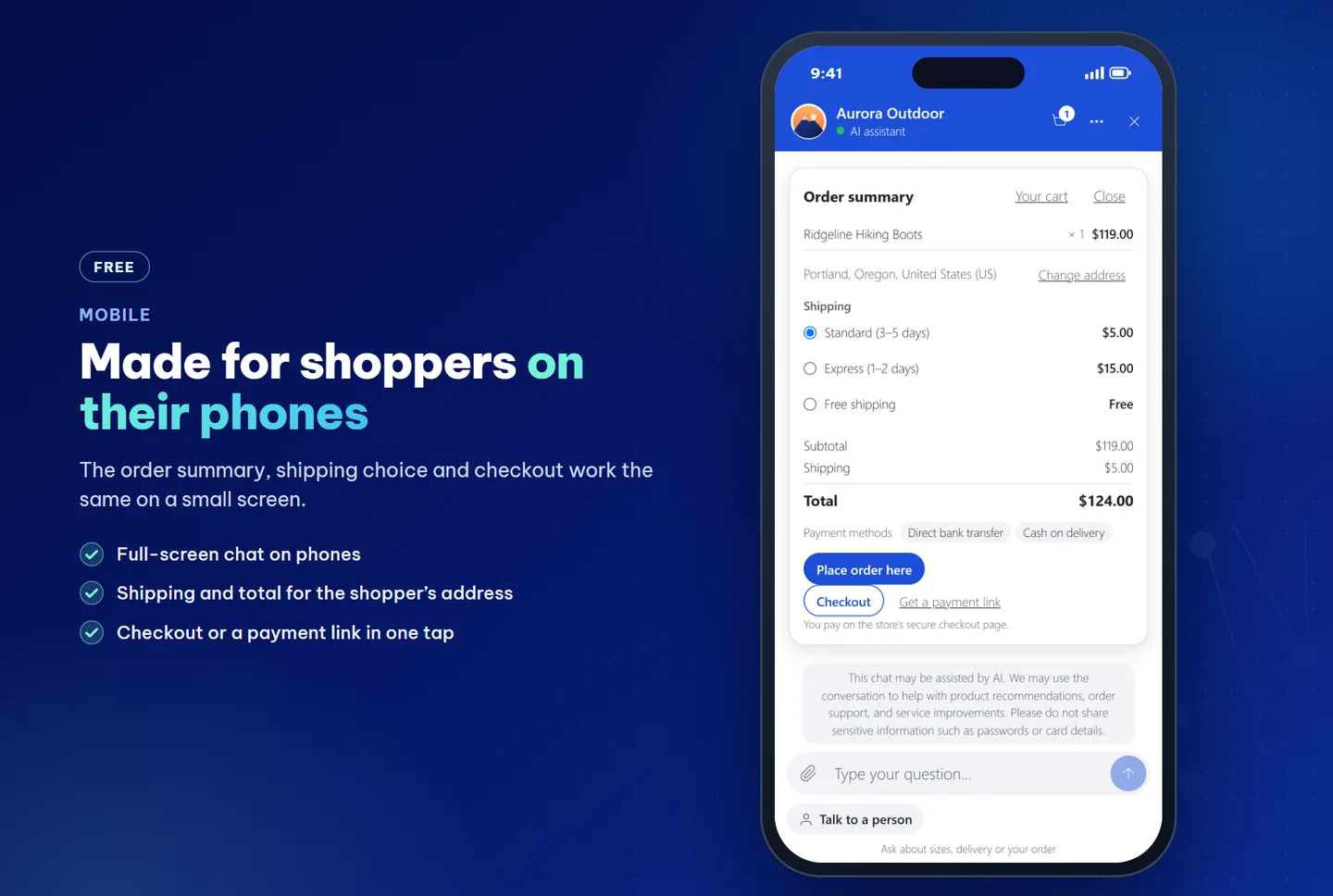
When a shopper asks about shipping, the chat shows an order summary: items, shipping options for their address, tax, subtotal, total and your payment methods. The numbers come from WooCommerce in the shopper’s browser, not from the AI.
- Shoppers change the address, pick standard or express and see the total at once.
- Checkout opens your checkout page with the cart filled. Nothing is ordered from the card.
- On phones the chat is full screen and checkout is one tap away.
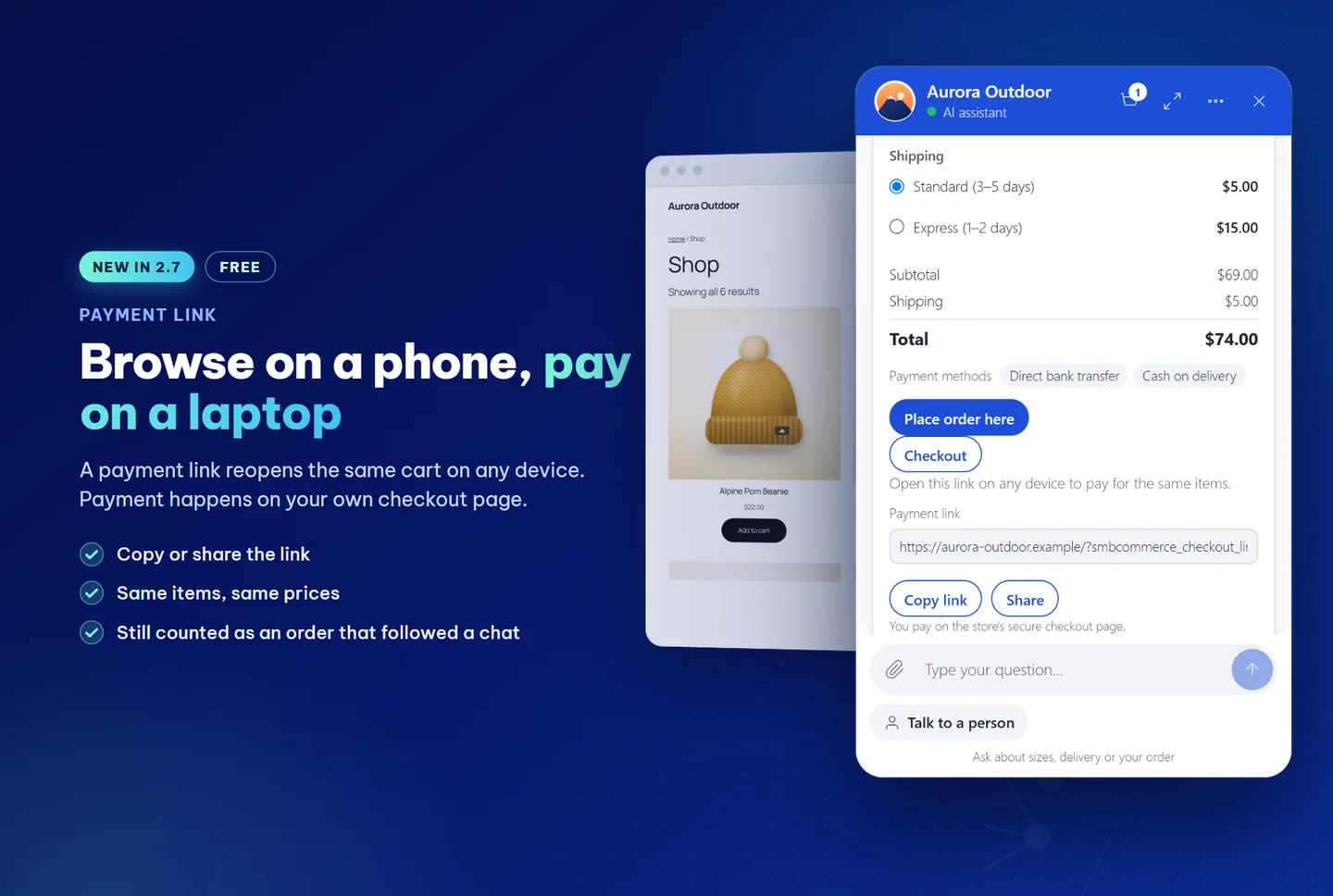
Payment link: browse on a phone, pay on a laptop
Shoppers tap “Get a payment link” for a link that reopens the same items at the same prices on any device. The assistant can also offer a “Checkout with these items” button.
- Copy or share the link.
- Payment happens on your own secure checkout page, through your gateway.
- Orders from a link still count as orders that followed a chat.
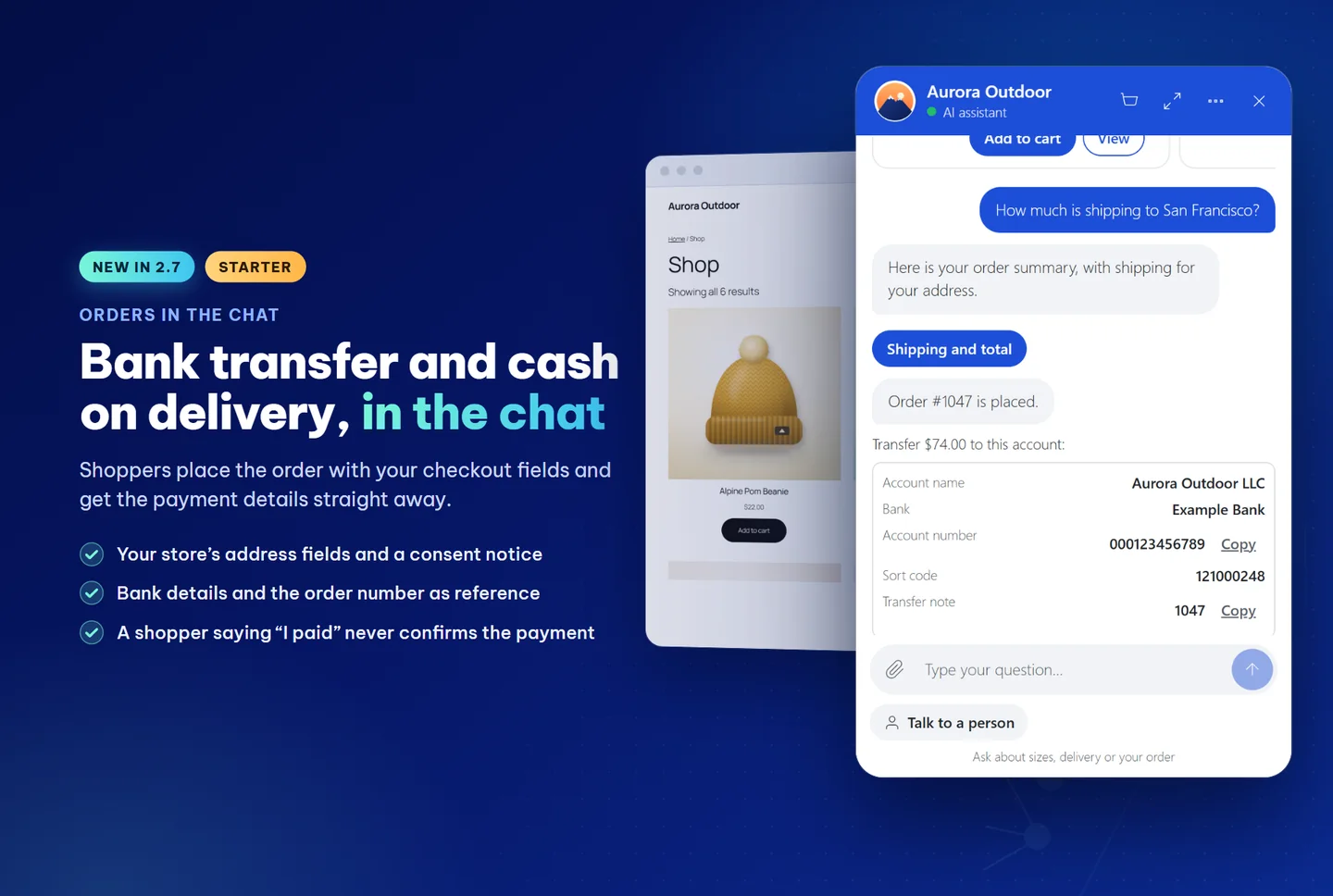
Bank transfer, COD and VietQR in the chat
For bank transfer and cash on delivery, shoppers place the order in the chat with your store’s address fields and a consent notice under the phone field.
- They get the account details, amount and the order number as the transfer reference straight away, with copy buttons.
- VietQR codes for orders in Vietnamese dong, made on your site.
- When the order is paid, the chat says “payment received”. A shopper saying they paid, or sending a screenshot, never confirms a payment: it opens a payment check for your team.
- Optional shipped, delivered and delivery-problem updates in the chat and by email (off by default).
- Stores with checkout fields the chat cannot show keep using the checkout page.
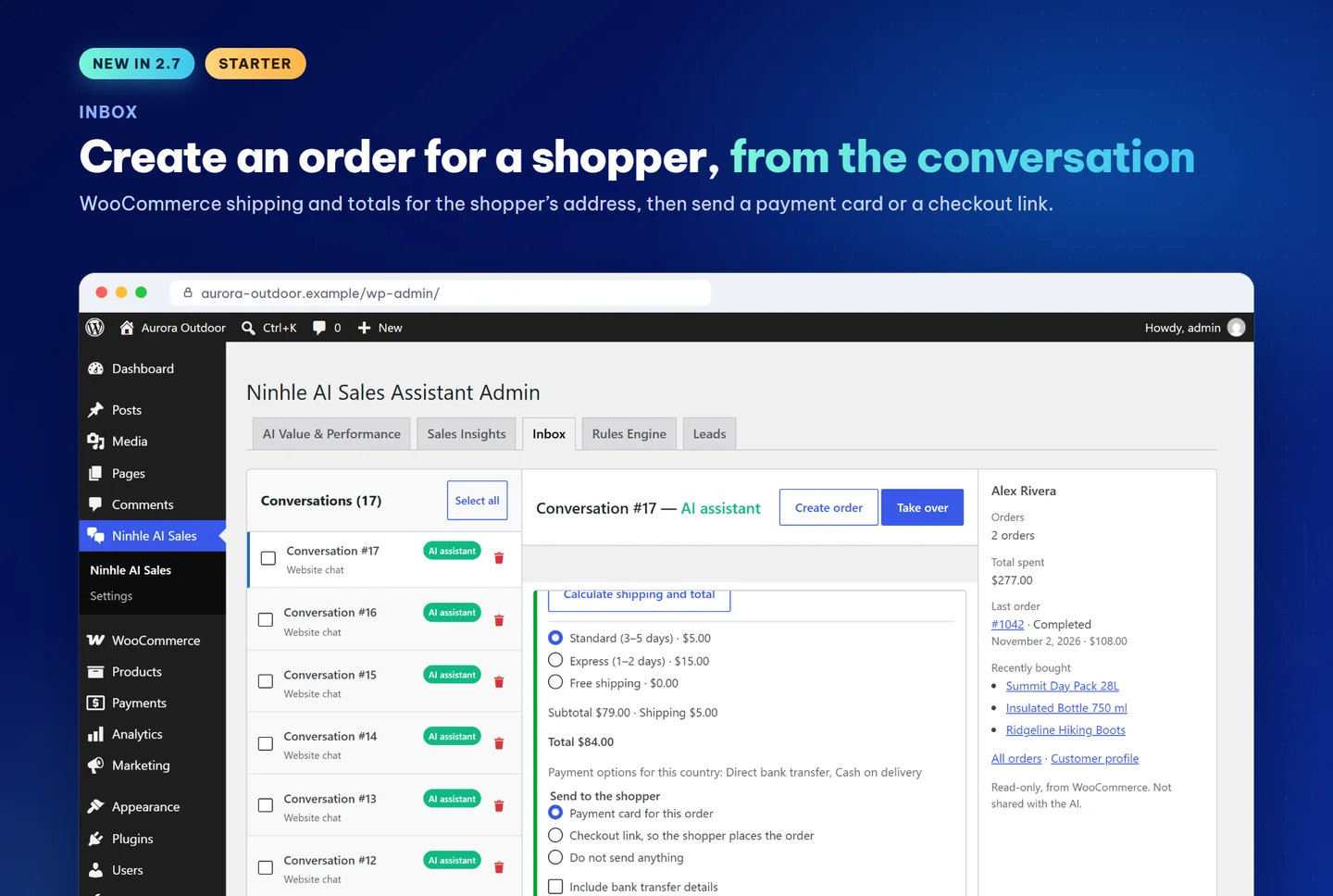
Create an order from the conversation
In the Inbox, your team clicks Create order, picks the items, lets WooCommerce calculate shipping and the total for the shopper’s address, then sends a payment card or a checkout link into the conversation, optionally with bank transfer details.
The side panel shows the customer card: orders, total spent, last order and recent products. Read-only, and never shared with the AI.
Product cards & add to cart
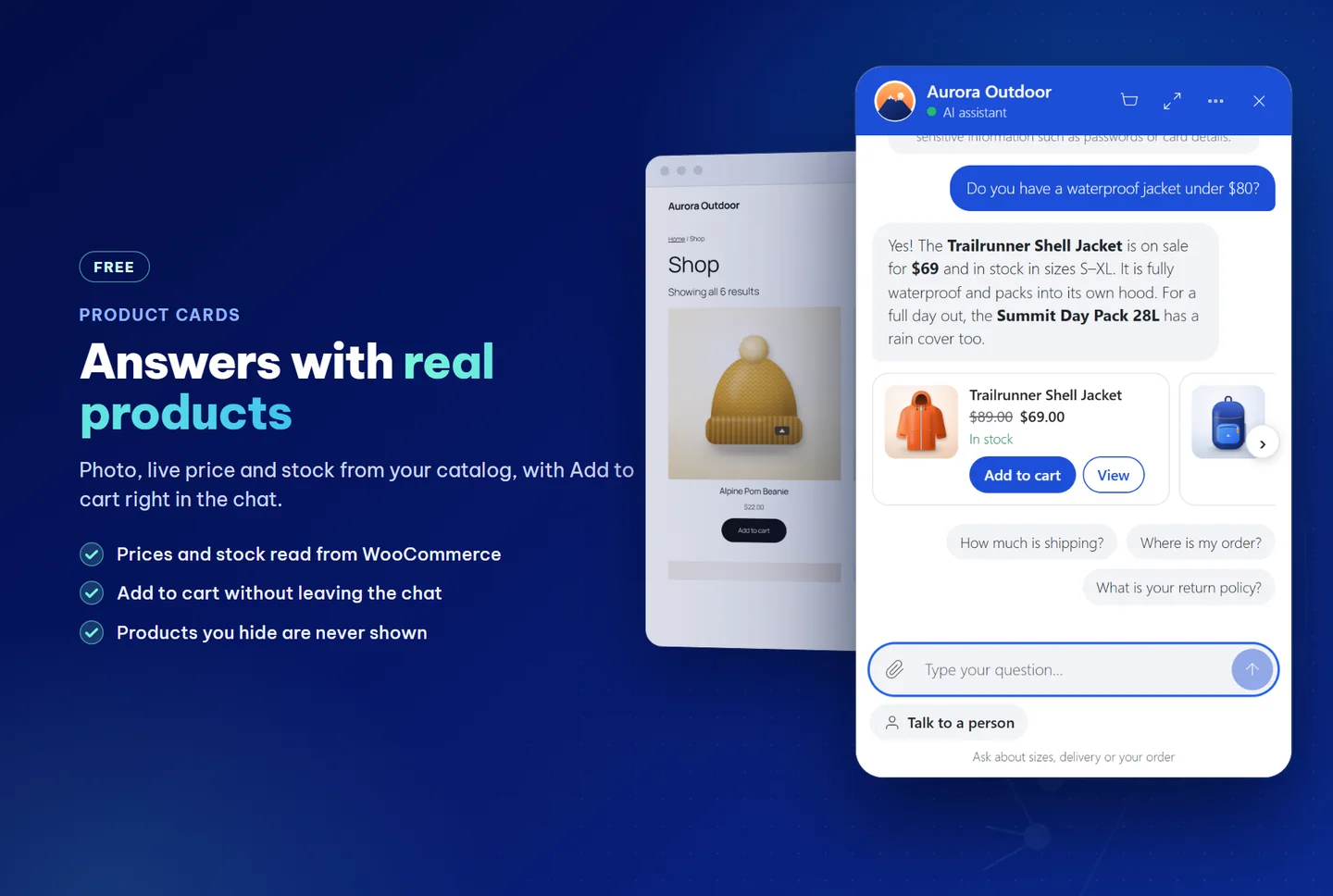
Product answers come with cards showing photo, current price, stock and rating, read from WooCommerce when the reply is shown. Shoppers press Add to cart without leaving the chat; products you hide are never shown. Starter adds options, quantities and discount codes on the card.
Order tracking: “Where is my order?”
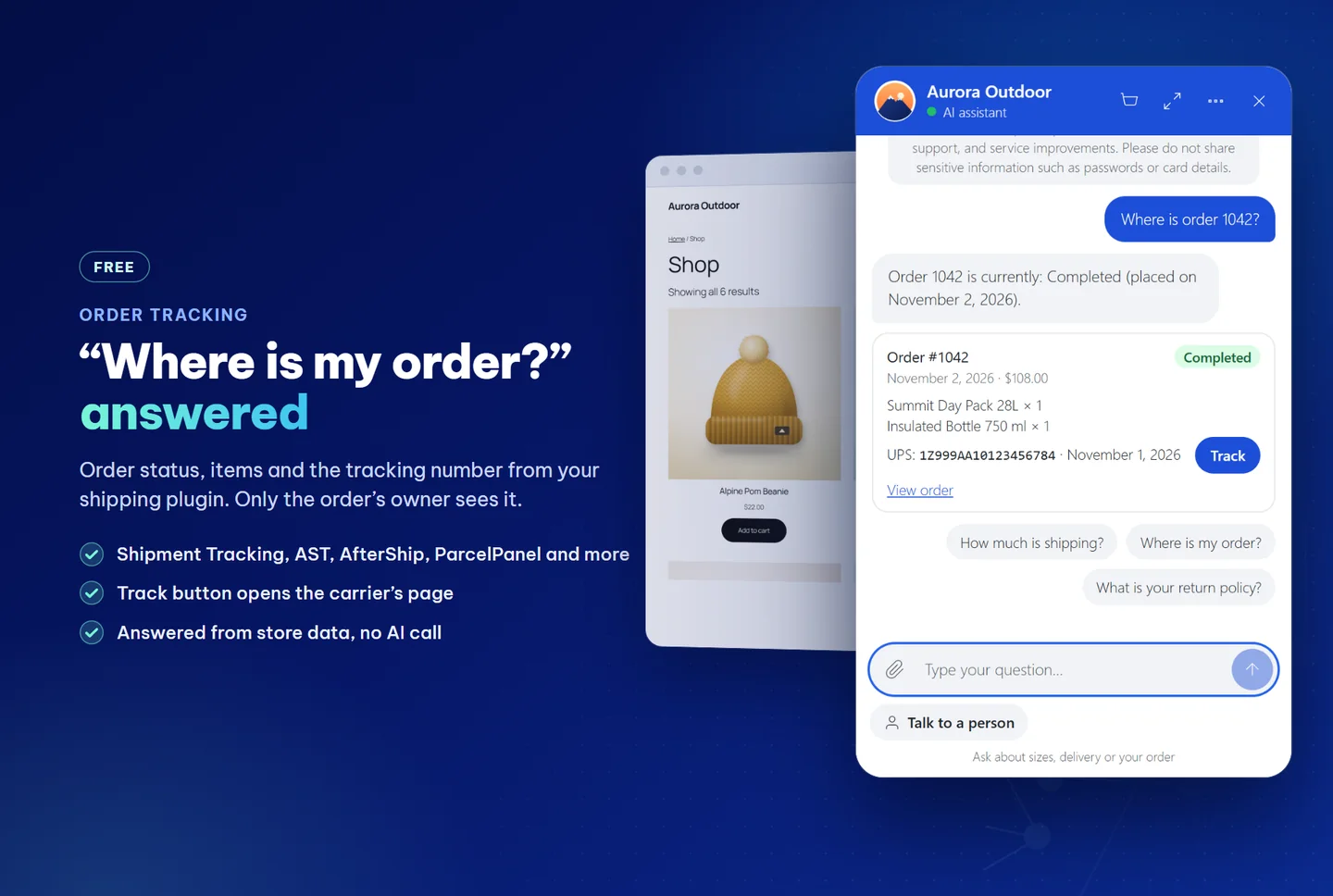
Shoppers ask about their order and get an order card: status, date, items, total, tracking number and a Track button to the carrier’s page. Answered from store data with no AI call, and only the order’s owner sees it.
Tracking numbers from WooCommerce Shipment Tracking, Advanced Shipment Tracking and, from 2.7.0, AfterShip, ParcelPanel, Trakoo, YITH Order Tracking and TrackShip, or an order field you choose.
Tools to sell more with less effort
Grounded product answers
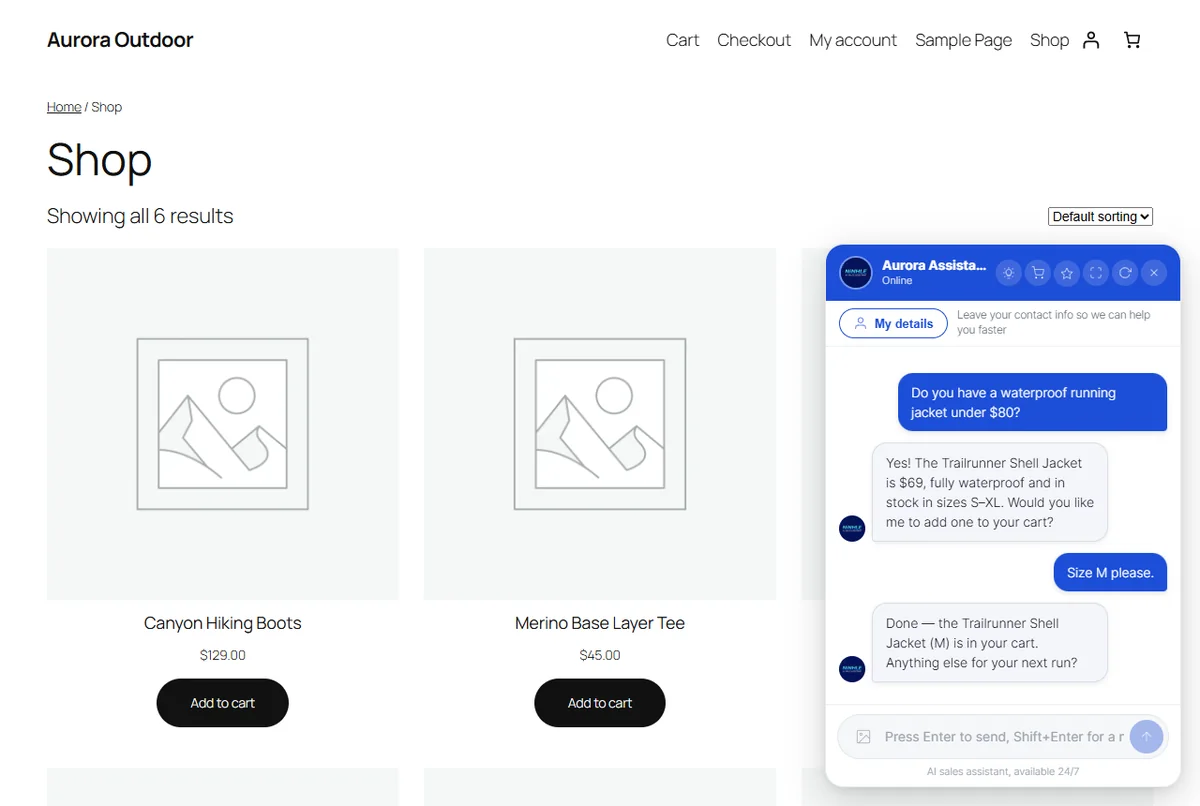
Searches products, reads details and policies; looks up orders only after the shopper proves ownership. Reads images, PDFs and pasted screenshots.
Sales playbook & rules
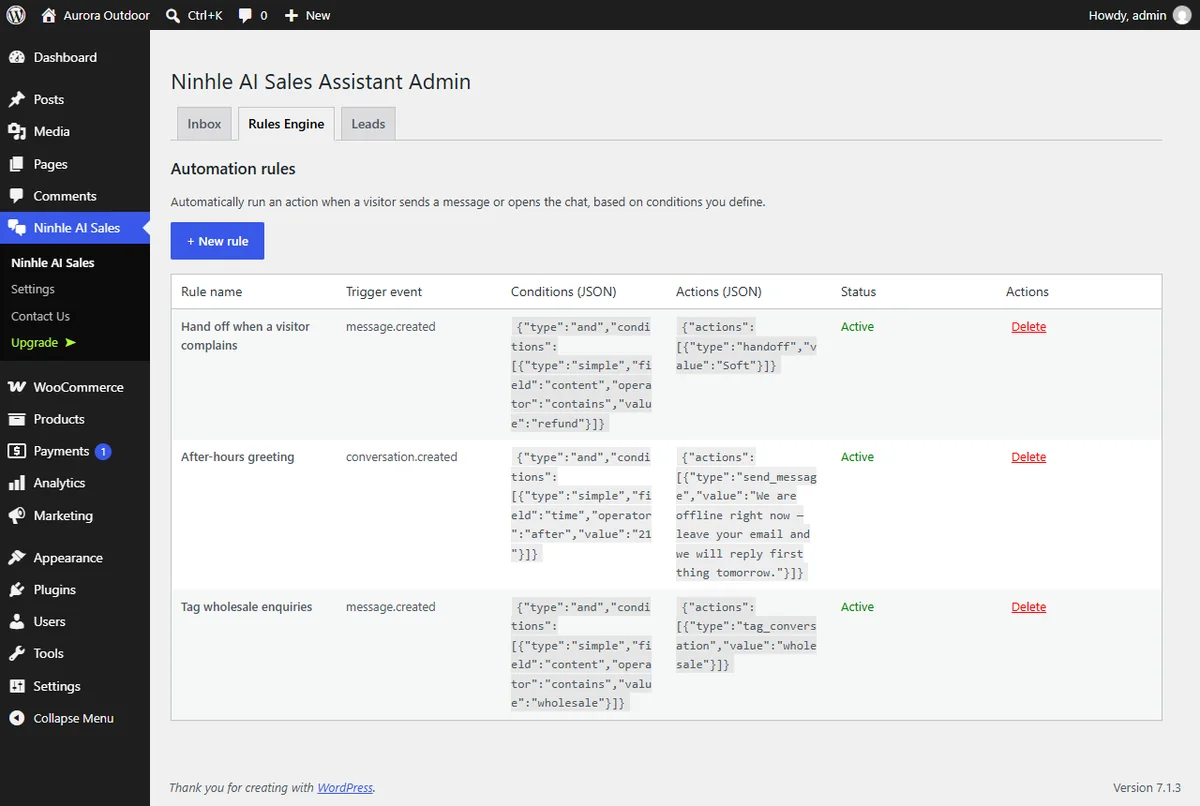
An editable playbook (persona, qualifying questions, objection handling, closing) plus keyword rules: automatic handoffs, after-hours greetings, tags.
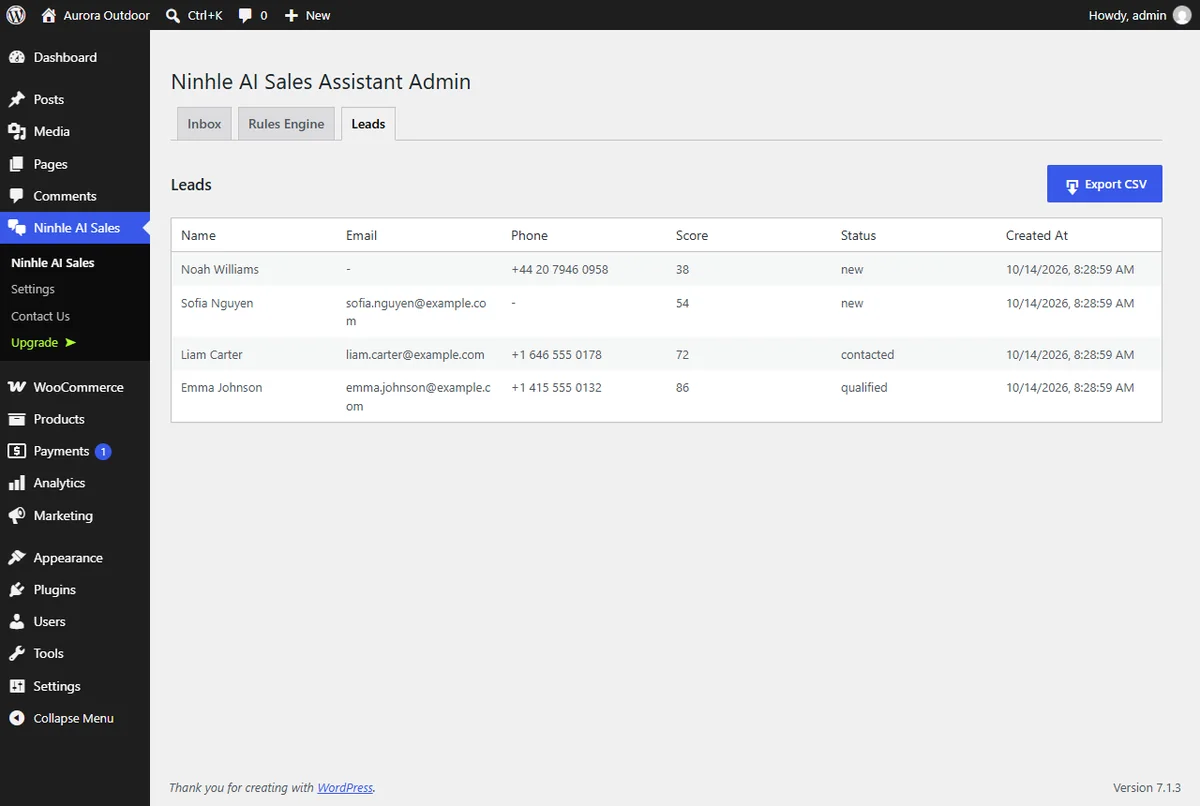
Lead capture & CSV export
Shoppers leave name, email and phone in the chat; export a CSV that opens correctly in Excel.
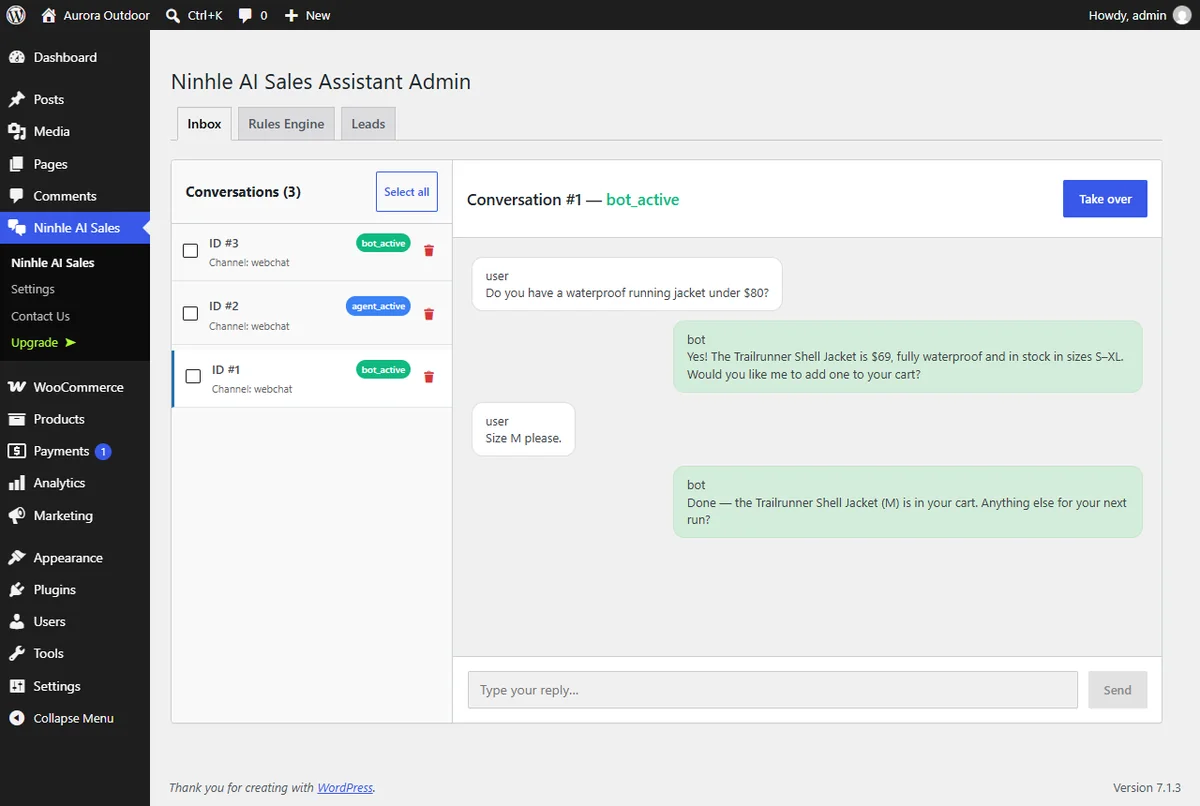
Human handoff & inbox
Shoppers can press “Talk to a person” at any time and always know whether they are talking to the AI or a person. Read every conversation, take over and reply, then hand back to the assistant; handoff webhook, Telegram on Starter and Pro.
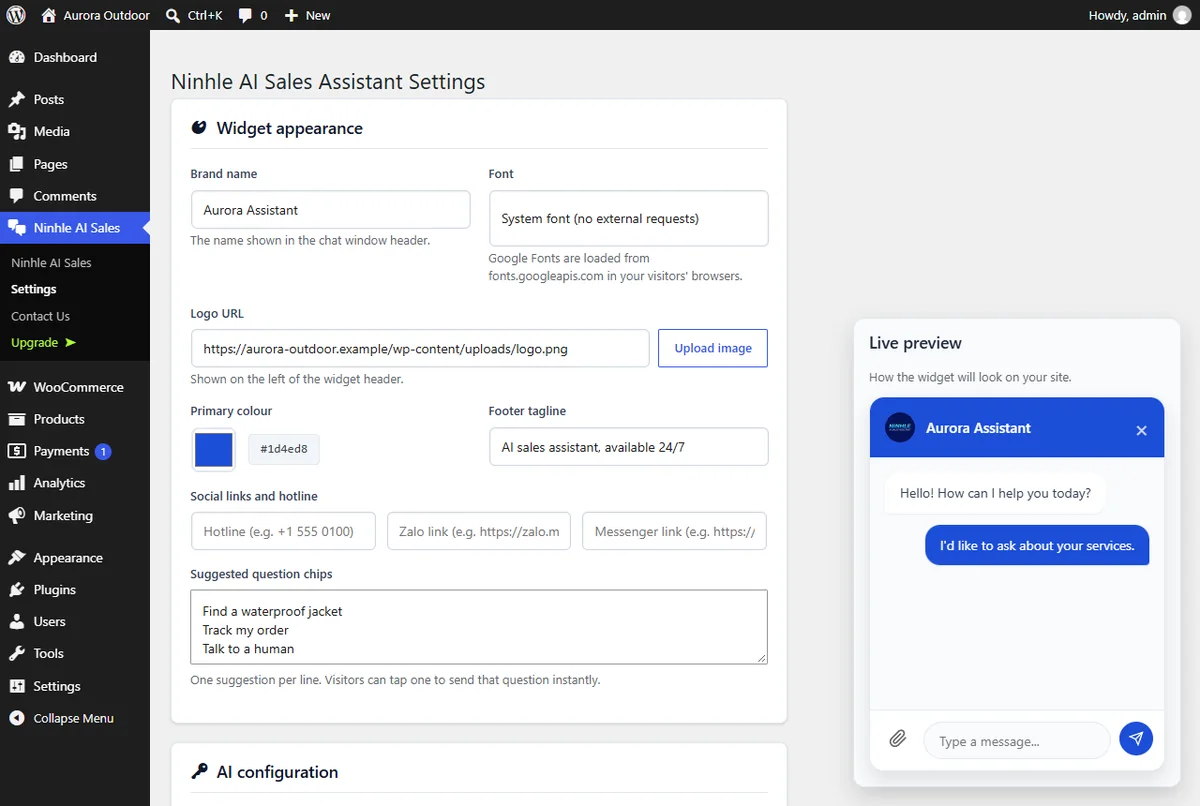
Your brand
Set the assistant name, logo, colour, font, tagline and suggestion chips with a live preview. It knows the date and time in your store’s timezone.
AI Value & Performance
One tab shows what the assistant costs (recorded from your AI provider’s real usage data), how many orders it helped with and how conversations ended. Figures start on the day you install or upgrade and always show the sample size. Included in every plan; revenue per currency on Starter and Pro.
Clean, formatted answers
Answers display the way a person would write them: bold text, nested lists, comparison tables, quotes, links and product images. Shoppers read faster, compare products more easily and never see stray characters like **.
Product images are checked before they show: a missing original falls back to a thumbnail, and an image that cannot load is hidden, so the chat never shows a broken image icon. Included in every plan, Free too.
Voice input
Visitors can speak instead of typing, which helps most on phones. Turn it on in Settings → “Let visitors speak their message” (off by default, every plan).
How it works & privacy
- The visitor taps the microphone and speaks; the browser turns it into text in the message box.
- They check the text and press send themselves. Nothing is sent automatically.
- Shown on https pages in Chrome, Edge and Safari (not yet in Firefox). Recognition follows your site language, including Vietnamese where the browser supports it.
- No extra cost: the browser does the recognition and the plugin calls no paid service for it.
- Privacy: the plugin never receives, records or stores audio, only the text the visitor chooses to send. Depending on the browser, audio may go to the browser maker’s speech service (Google for Chrome, Apple for Safari, Microsoft for Edge); the plugin adds this to its suggested privacy-policy text when the feature is on.
Start free, upgrade when you need
Prices in USD, billed securely by Freemius. Each licence covers 1 website. 14-day money-back guarantee. AI usage is billed directly by your provider for your own API key.
Free
AI sales assistant grounded in your store data.
- AI Sales & Support Chat
- Formatted answers & product images
- Product cards, Add to cart, order tracking
- Shipping, total & payment link in the chat
- Voice input (optional)
- AI Value & Performance
- AI Providers
- Grounded Store Answers
- Sales Playbook & Rules
- Lead Capture & CSV Export
- Human Handoff & Inbox
- Widget Branding
- Languages
- Local-only Mode
Starter
Orders in the chat, VietQR, webhooks & sales dashboard.
Everything in Free, plus:
- AI-assisted Revenue
- Product Variations
- Telegram Alerts
- Sales Dashboard
- Response Cache
- Bank transfer & COD orders, VietQR
- Create orders from the Inbox
- Payment received & shipment updates
- Signed Webhooks (n8n, Make, Zapier, CRM)
Pro
For scale: failover, AI budget caps, lead scoring & your own AI agent.
Everything in Starter, plus:
- AI Providers: 1 + auto failover
- Coupon Validation
- AI Budget Caps
- Lead Scoring & Analytics
- Price Verification
- Sales abilities for your own AI agent (MCP)
- Payment methods by country or group
Full feature comparison: Free · Starter · Pro
| Feature | Free | Starter | Pro |
|---|---|---|---|
| AI Sales & Support Chat | ✓ | ✓ | ✓ |
| Product cards with Add to cart (2.6) | ✓ | ✓ | ✓ |
| Options, quantities and discount codes on cards | — | ✓ | ✓ |
| Order summary: shipping, tax, total (new in 2.7) | ✓ | ✓ | ✓ |
| Payment link for any device (new in 2.7) | ✓ | ✓ | ✓ |
| Order tracking with tracking numbers | ✓ | ✓ | ✓ |
| Sales Insights tab | ✓ | ✓ | ✓ |
| Bank transfer & COD orders in the chat, VietQR (new in 2.7) | — | ✓ | ✓ |
| Create orders from the Inbox (new in 2.7) | — | ✓ | ✓ |
| Payment received & shipment updates (new in 2.7) | — | ✓ | ✓ |
| Formatted answers: bold, lists, tables, product images | ✓ | ✓ | ✓ |
| Voice input (optional, off by default) | ✓ | ✓ | ✓ |
| AI Value & Performance: cost, AI-assisted orders, outcomes | ✓ | ✓ | ✓ |
| AI-assisted revenue per currency | — | ✓ | ✓ |
| Always-visible “Talk to a person” button | ✓ | ✓ | ✓ |
| AI Providers | 1 active | 1 active | 1 + auto failover |
| Grounded Store Answers | ✓ | ✓ | ✓ |
| Sales Playbook & Rules | ✓ | ✓ | ✓ |
| Lead Capture & CSV Export | ✓ | ✓ | ✓ |
| Human Handoff & Inbox | ✓ | ✓ | ✓ |
| Widget Branding | ✓ | ✓ | ✓ |
| Languages | ✓ | ✓ | ✓ |
| Local-only Mode | ✓ | ✓ | ✓ |
| Product Variations | — | ✓ | ✓ |
| Telegram Alerts | — | ✓ | ✓ |
| Sales Dashboard | — | ✓ | ✓ |
| Response Cache | — | ✓ | ✓ |
| Coupon Validation | — | — | ✓ |
| AI Budget Caps | — | — | ✓ |
| Lead Scoring & Analytics | — | — | ✓ |
| Price Verification | — | — | ✓ |
| Signed Webhooks (n8n, Make, Zapier, CRM) | — | ✓ (2.7) | ✓ |
| Sales abilities for your own AI agent (new in 2.7) | — | — | ✓ |
| Payment method order by country or customer group | — | — | ✓ |
Coupon codes
| Code | Off | Conditions |
|---|---|---|
LAUNCH30 | −30% | New customers, until 14 Nov 2026, up to 100 uses |
WELCOME15 | −15% | New customers, no expiry |
BFCM40 | −40% | Black Friday – Cyber Monday, 24 Nov to 2 Dec 2026, up to 200 uses |
UPGRADE20 | −20% | Existing customers upgrading to Pro |
Enter the code on the Freemius checkout. Codes discount the first payment only; renewals are charged at the regular price. The current campaign code is applied to the buy buttons automatically.
Payment, licence and refunds
- Pay by card or PayPal on Freemius’ secure checkout.
- After purchase you receive an email with your licence key and the Premium download; install it and enter the licence in WordPress.
- Monthly and annual plans renew automatically; cancel renewal any time from your Freemius account.
- Lifetime plans are a one-time payment.
- 14-day money-back guarantee if it is not the right fit.
Recommend it, earn 30% commission
Recommend Ninhle AI Sales Assistant to WooCommerce stores and earn commission. Ideal for agencies, freelance web developers, bloggers, YouTubers and existing users.
How to apply
- Install Ninhle AI Sales Assistant on your WordPress site (the Free version from WordPress.org is enough).
- Open the Ninhle AI Sales menu. The first time, choose “Allow & Continue” or “Skip” on the connection screen.
- Go to Ninhle AI Sales → Affiliation, or click the “Earn 30% commission” link on the plugin’s Settings page.
- Click Become an affiliate, fill in your email, name, PayPal email, the website you will promote on and how, then click Apply to become an affiliate.
- If you see “Account is pending activation”, confirm the email Freemius sent you and submit the form again.
- Once approved, you receive your referral link by email and track earnings in your Freemius account.
Not on WordPress? Send us your website and how you plan to promote through the Contact page and we will set up your affiliate account. Please disclose that your links are affiliate links when you share them.
Your data stays on your site
- API keys are encrypted, stored server-side and never sent to the browser.
- Conversations, contacts and leads stay in your WordPress database.
- Works with WordPress personal-data export and erasure.
- Per-session rate limiting; chat responses are never stored by page caches.
- Voice input (if enabled): the plugin never receives, records or stores audio.
- The chat window loads only when opened; nothing loads from third-party servers unless you pick a Google font.
Live in 4 steps
Requirements: WordPress 6.3+, PHP 8.1+. WooCommerce is needed for product, cart and order features; chat and lead capture work on any WordPress site.
- Install the Free version from WordPress.org (Plugins → Add New → search “Ninhle AI Sales Assistant”).
- Open Ninhle AI Sales → Settings and enter an API key (or choose local-only mode).
- Fill in your store information and review the sales playbook.
- Click Sync products now; set your timezone in Settings → General.
Frequently asked questions
Is the Free version time-limited?
No. The Free version on WordPress.org is fully usable with no time limit; paid plans add features.
Do I pay for AI usage?
Yes, if you use an AI provider: you use your own API key and the provider bills you directly. Local-only mode needs no key.
How do I get the plugin after buying?
Freemius emails you the licence key and the Premium download. Install it and enter the licence to unlock your plan.
What is the difference between annual and lifetime?
Annual plans are billed every year and can be cancelled any time; lifetime plans are a one-time payment.
Do coupons apply to renewals?
No. Coupons discount the first payment only; renewals are charged at the regular price.
How many websites does a licence cover?
Each licence covers 1 website. Contact us if you need more.
Is there a Pro trial?
Yes, 14 days free, for the Pro plan only. Install the Free version, then open Ninhle AI Sales → Upgrade in WordPress to start the trial.
How do I upgrade from Starter to Pro?
Upgrade from Ninhle AI Sales → Upgrade and enter UPGRADE20 for 20% off your first Pro payment.
What is the refund policy?
Paid plans have a 14-day money-back guarantee.
Does it make up prices or stock?
No. Product facts come from lookups in your store; without data it says so and offers a handoff.
Does it reply in Vietnamese?
Yes. With a Vietnamese sales playbook it replies in Vietnamese, and the admin interface is available in Vietnamese.
Does it work with ChatGPT, Claude or Gemini?
Yes. Choose OpenAI (ChatGPT), Anthropic Claude or Google Gemini and add your own API key. On Pro, it automatically fails over to a backup provider if the main one has an error.
How is it different from a scripted chatbot?
A scripted chatbot only follows pre-written replies. Ninhle AI Sales Assistant looks up your WooCommerce catalog while it chats, so it answers open questions about products, prices and stock, recommends the right product with an add-to-cart link and captures the lead.
How can I control monthly AI costs?
AI cost depends on message volume and the model you choose, and your provider bills you directly. Starter adds a response cache for repeated questions; Pro adds daily and monthly AI budget caps. In our internal test of 60 conversations with GPT-4o mini, AI cost about US$0.0006 per conversation; larger models cost more. The AI Value & Performance tab shows what your own store actually spent.
How do I see how many orders the assistant helped with?
Open the AI Value & Performance tab. It shows AI cost, AI-assisted orders (placed within 24 hours, 72 hours or 7 days, as you choose, after the shopper was shown products or clicked a product or cart link in the chat) and how each conversation ended. Revenue per currency is on Starter and Pro.
How do I become an affiliate?
Install the plugin (the Free version is enough), open Ninhle AI Sales → Affiliation and apply. 30% commission on new licences and automatic renewals, 45-day cookie, PayPal payouts from $100. See the Affiliate program section.
How does voice input work, and does it cost extra?
Turn it on in Settings → “Let visitors speak their message”. The visitor taps the microphone and speaks, the browser turns it into text, and they check it before pressing send. No extra cost: the browser does the recognition and the plugin calls no paid service for it.
Does voice input understand Vietnamese, and which browsers work?
Yes, where the browser supports Vietnamese recognition (recent Chrome, Edge and Safari). Recognition follows your site language. The microphone button appears only on https pages; Firefox does not support it yet.
Does the plugin record or store visitors’ voices?
No. The plugin never receives, records or stores audio, only the text the visitor chooses to send. Depending on the browser, audio may be sent to the browser maker’s speech service (Google for Chrome, Apple for Safari, Microsoft for Edge); the plugin adds this to its suggested privacy-policy text when the feature is on.
Can shoppers pay by card inside the chat?
No. Card and wallet payments always happen on your secure checkout page through your gateway; the chat calculates shipping and the total and opens checkout with the cart filled (every plan). On Starter, shoppers can place bank-transfer or cash-on-delivery orders in the chat, with VietQR codes for orders in VND. A shopper saying they paid never confirms a payment.
How do answers look in the chat?
From version 2.5.0, answers display cleanly: bold text, nested lists, tables, quotes, links and product images. Broken images fall back to a thumbnail or are hidden, never shown as a broken icon. Included in every plan.
Will it slow down my store?
The chat button is small, and the chat window and voice input load only when a visitor opens the chat. Nothing is loaded from third-party servers unless you pick a Google font for the widget.
Will upgrading to 2.5.0 lose any data?
No. Upgrading from 2.4.1 was tested: conversations, leads, rules, settings and AI Value figures are kept, and the database structure does not change.
How does it relate to Nexus Sale?
It is the same product. From version 2.3.0, Nexus Sale was renamed Ninhle AI Sales Assistant, with security, accuracy and compatibility improvements.
Let an AI assistant start selling for you today
Install the Free version to try it on your store, or pick a plan above. Need setup help? Get in touch.
Updated: 2 Nov 2026 (version 2.7.0). Prices and offers from Freemius.
Câu hỏi thường gặp
Ninhle AI Sales Assistant là gì?
Đây là plugin trợ lý AI bán hàng và hỗ trợ khách cho WooCommerce. Plugin trả lời từ dữ liệu thật của cửa hàng, gợi ý sản phẩm, thu thập lead và chuyển cho nhân viên khi cần.
Plugin hỗ trợ những nhà cung cấp AI nào?
Plugin hỗ trợ OpenAI, Anthropic Claude và Google Gemini theo kiểu bring your own key, tức dùng API key của bạn. Gói Pro có thêm tự động chuyển sang nhà cung cấp dự phòng khi gặp sự cố.
Giá các gói và chính sách hoàn tiền thế nào?
Gói Free là $0. Starter $36/năm (hoặc $4.99/tháng), Pro $75/năm (hoặc $9.99/tháng), mỗi license dùng cho 1 website. Có dùng thử Pro 14 ngày và hoàn tiền trong 14 ngày.
Chatbot có tự bịa giá hoặc chính sách không?
Không. Giá, tồn kho, phí ship và chi tiết đơn hàng được đọc từ WooCommerce. Nếu chưa có dữ liệu hoặc chưa cài chính sách, trợ lý sẽ đề nghị hỏi lại nhân viên thay vì đoán.
Chatbot có hỗ trợ thanh toán chuyển khoản, COD và VietQR không?
Có, từ gói Starter, khách đặt đơn chuyển khoản hoặc COD ngay trong chat. Mã VietQR được tạo trên website của bạn cho đơn tính bằng đồng Việt Nam.