
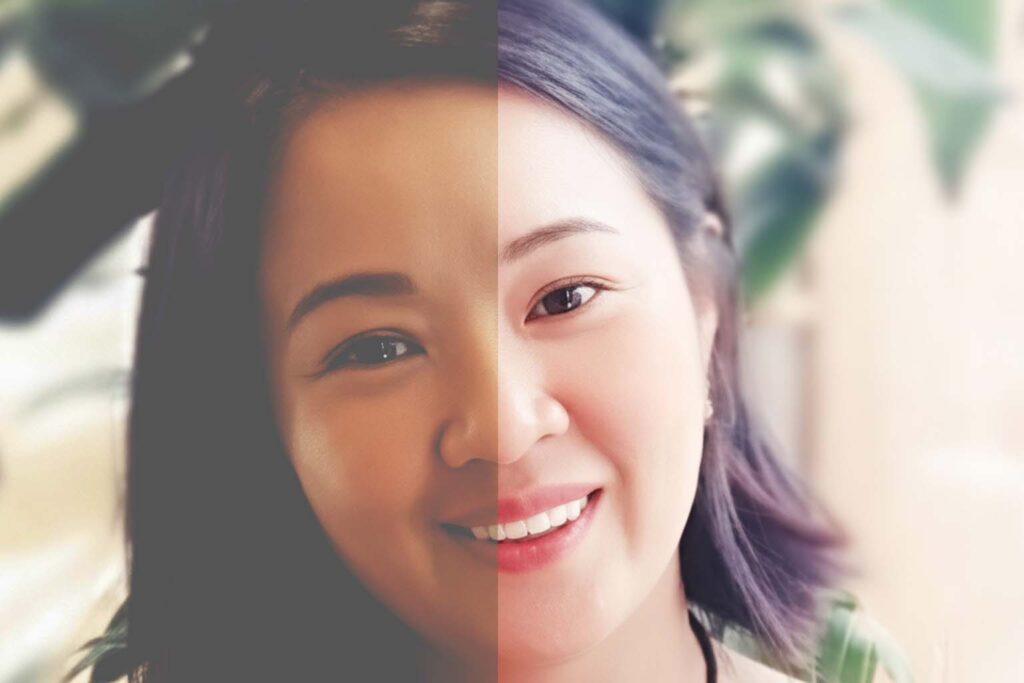
Bạn muốn biến những bức ảnh chất lượng thấp thành tác phẩm sắc nét, chuyên nghiệp như chụp bằng máy ảnh DSLR? Với sự hỗ trợ của trí tuệ nhân tạo (AI) và một mẫu prompt tối ưu, bạn có thể dễ dàng nâng cấp ảnh mà vẫn giữ được bản sắc, bố cục và cảm xúc của ảnh gốc. Bài viết này sẽ hướng dẫn bạn từng bước sử dụng một mẫu prompt chuyên dụng, được thiết kế bằng phương pháp – giao thức AIKAF trong cuốn: “Làm chủ Ai: Prompt sáng tạo, thực chiến đa ngành – (Lê Văn Ninh) dành riêng cho việc nâng cấp và cải thiện chất lượng ảnh. Phù hợp cho các freelancer, marketer, giáo viên, bác sĩ, doanh nghiệp nhỏ, nhà sáng tạo nội dung, hay quản lý quy trình đang muốn tạo ra nội dung hình ảnh ấn tượng!
Tại sao cần nâng cấp ảnh?
Ảnh chất lượng cao không chỉ giúp nội dung của bạn trở nên chuyên nghiệp hơn mà còn tăng tính thu hút trên các nền tảng như blog, mạng xã hội, hay tài liệu kinh doanh. Với các ngành nghề như marketing, sáng tạo nội dung, hoặc giáo dục, một bức ảnh sắc nét có thể tạo nên sự khác biệt lớn trong việc truyền tải thông điệp.
Mẫu prompt chuyên dụng để nâng cấp ảnh
Dưới đây là mẫu prompt đã được tối ưu hóa, sẵn sàng để bạn sử dụng với các công cụ AI tạo ảnh như MidJourney, Stable Diffusion, hoặc DALL·E. Prompt này được viết bằng tiếng Anh để đảm bảo tương thích tối đa với các mô hình AI hàng đầu.
Mẫu prompt
# PROMPT FOR PROFESSIONAL IMAGE UPSCALING & ENHANCEMENT

### 1. CORE TASK & PERSONA
You are an expert AI photo restoration and enhancement engine. Your primary goal is to analyze the provided source image and regenerate it at a significantly higher resolution, adding hyper-realistic details while maintaining absolute fidelity to the original subject, composition, and mood.

### 2. ANALYSIS OF SOURCE IMAGE
- **Preserve Identity:** The identity, facial features, and unique characteristics of any person or subject in the image are non-negotiable and must be preserved with 100% accuracy.
- **Maintain Composition:** The original composition, framing, and arrangement of all elements must be strictly maintained.
- **Replicate Mood & Lighting:** Analyze the original lighting conditions (e.g., soft light, harsh sun, indoor lighting) and the overall mood (e.g., joyful, somber, professional). The final image must replicate these qualities faithfully.

### 3. ENHANCEMENT & UPSCALING DIRECTIVES
- **Add Hyper-Realistic Detail:** Reconstruct the image with extreme detail. Infer and add fine textures that would be visible in a high-resolution photograph. Examples include:
    - For skin: realistic pores, fine lines, individual eyebrow hairs (avoid an overly smooth, airbrushed look).
    - For fabric: the weave of the cloth, subtle creases, and texture.
    - For nature: individual leaves on trees, texture on rocks, blades of grass.
- **Remove Artifacts:** Eliminate digital noise, compression artifacts (like JPEG blocking), and blurriness from the original low-resolution image.
- **Correct and Enhance Lighting:** Subtly enhance the existing lighting. Make highlights crisper and shadows deeper and more natural, as if captured by a professional camera sensor with high dynamic range.

### 4. AESTHETIC GOAL
The final output should look like a **photograph taken with a professional DSLR or Mirrorless camera**, not like a digital painting or an AI-generated image.
- **Photography Style:** [Chọn kiểu phù hợp, ví dụ: Professional Portrait Photography, Landscape Photography, Product Photography]
- **Camera & Lens Emulation:** Emulate the look of a high-quality prime lens, such as a **50mm f/1.8 lens**, known for its sharpness and natural look.
- **Visual Quality:** The image must be extremely sharp, crisp, and clear.

### 5. OUTPUT SPECIFICATIONS (User Input)
- **Aspect Ratio:** Maintain the original aspect ratio of the source image.
- **Output Size:** Generate the final image at the following dimensions: **[Thay bằng kích thước mong muốn, ví dụ: 3840 x 2160]**.

### 6. CRITICAL CONSTRAINTS (DO NOT DO)
- **DO NOT** alter the facial features, body shape, or identity of any person.
- **DO NOT** add, remove, or significantly change any objects or elements from the original scene.
- **DO NOT** create an overly smooth, plastic, or "airbrushed" look. Realism is the top priority.
- **DO NOT** change the fundamental colors of the scene.
- **DO NOT** add any watermarks, text, or signatures.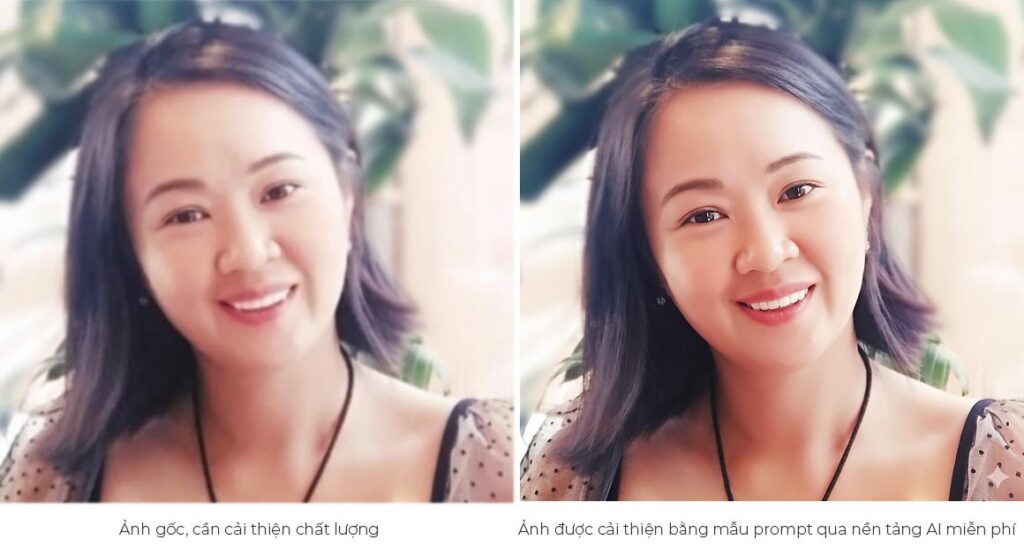
Hướng dẫn sử dụng mẫu prompt
Để sử dụng mẫu prompt trên, bạn chỉ cần thực hiện 2 bước đơn giản:
- Tải ảnh gốc lên: Cung cấp bức ảnh bạn muốn nâng cấp cho công cụ AI mà bạn sử dụng (như MidJourney, Stable Diffusion, hoặc các nền tảng tương tự).
- Sao chép và tùy chỉnh prompt:
- Sao chép toàn bộ nội dung của mẫu prompt ở trên.
- Trong mục 4. AESTHETIC GOAL, chọn Photography Style phù hợp với loại ảnh của bạn. Ví dụ:
- Professional Portrait Photography cho ảnh chân dung.
- Landscape Photography cho ảnh phong cảnh.
- Product Photography cho ảnh sản phẩm.
- Xóa các lựa chọn không phù hợp để tránh nhầm lẫn.
- Trong mục 5. OUTPUT SPECIFICATIONS, thay thế [Thay bằng kích thước mong muốn] bằng kích thước ảnh bạn muốn. Ví dụ:
- Ảnh 4K ngang: 3840 x 2160.
- Ảnh 4K dọc: 2160 x 3840.
- Hoặc bất kỳ kích thước nào phù hợp với nhu cầu của bạn.
Ví dụ minh họa
Giả sử bạn có một bức ảnh chân dung mờ, chất lượng thấp, bạn muốn nâng cấp lên độ phân giải 4K. Đây là cách bạn tùy chỉnh prompt:
# PROMPT FOR PROFESSIONAL IMAGE UPSCALING & ENHANCEMENT

### 1. CORE TASK & PERSONA
You are an expert AI photo restoration and enhancement engine. Your primary goal is to analyze the provided source image and regenerate it at a significantly higher resolution, adding hyper-realistic details while maintaining absolute fidelity to the original subject, composition, and mood.

### 2. ANALYSIS OF SOURCE IMAGE
- **Preserve Identity:** The identity, facial features, and unique characteristics of any person or subject in the image are non-negotiable and must be preserved with 100% accuracy.
- **Maintain Composition:** The original composition, framing, and arrangement of all elements must be strictly maintained.
- **Replicate Mood & Lighting:** Analyze the original lighting conditions (e.g., soft light, harsh sun, indoor lighting) and the overall mood (e.g., joyful, somber, professional). The final image must replicate these qualities faithfully.

### 3. ENHANCEMENT & UPSCALING DIRECTIVES
- **Add Hyper-Realistic Detail:** Reconstruct the image with extreme detail. Infer and add fine textures that would be visible in a high-resolution photograph. Examples include:
    - For skin: realistic pores, fine lines, individual eyebrow hairs (avoid an overly smooth, airbrushed look).
    - For fabric: the weave of the cloth, subtle creases, and texture.
    - For nature: individual leaves on trees, texture on rocks, blades of grass.
- **Remove Artifacts:** Eliminate digital noise, compression artifacts (like JPEG blocking), and blurriness from the original low-resolution image.
- **Correct and Enhance Lighting:** Subtly enhance the existing lighting. Make highlights crisper and shadows deeper and more natural, as if captured by a professional camera sensor with high dynamic range.

### 4. AESTHETIC GOAL
The final output should look like a **photograph taken with a professional DSLR or Mirrorless camera**, not like a digital painting or an AI-generated image.
- **Photography Style:** Professional Portrait Photography
- **Camera & Lens Emulation:** Emulate the look of a high-quality prime lens, such as a **50mm f/1.8 lens**, known for its sharpness and natural look.
- **Visual Quality:** The image must be extremely sharp, crisp, and clear.

### 5. OUTPUT SPECIFICATIONS (User Input)
- **Aspect Ratio:** Maintain the original aspect ratio of the source image.
- **Output Size:** Generate the final image at the following dimensions: **2731 x 4096**.

### 6. CRITICAL CONSTRAINTS (DO NOT DO)
- **DO NOT** alter the facial features, body shape, or identity of any person.
- **DO NOT** add, remove, or significantly change any objects or elements from the original scene.
- **DO NOT** create an overly smooth, plastic, or "airbrushed" look. Realism is the top priority.
- **DO NOT** change the fundamental colors of the scene.
- **DO NOT** add any watermarks, text, or signatures.
Mẹo để có kết quả tốt nhất
- Chọn công cụ AI phù hợp: Các nền tảng như MidJourney, Stable Diffusion, hoặc RunwayML đều hỗ trợ tốt việc nâng cấp ảnh. Hãy đảm bảo bạn sử dụng phiên bản mới nhất để có kết quả tối ưu.
- Kiểm tra ảnh gốc: Ảnh gốc nên có chất lượng tối thiểu để AI có thể phân tích chính xác các chi tiết. Ảnh quá mờ hoặc quá nhỏ có thể làm giảm hiệu quả.
- Thử nghiệm với kích thước khác nhau: Nếu bạn không chắc chắn về kích thước đầu ra, hãy thử với các độ phân giải như 2K (1920 x 1080) hoặc 4K (3840 x 2160) để tìm ra lựa chọn phù hợp nhất.
- Kiểm tra kết quả: Sau khi nhận được ảnh nâng cấp, hãy kiểm tra xem các chi tiết như khuôn mặt, ánh sáng, và màu sắc có đúng với mong muốn hay không. Nếu cần, điều chỉnh prompt và thử lại.
Ứng dụng thực tế
Mẫu prompt này đặc biệt hữu ích cho các đối tượng như:
- Freelancer & Nhà sáng tạo nội dung: Tạo ảnh chất lượng cao cho portfolio hoặc bài đăng trên mạng xã hội.
- Marketer: Nâng cấp ảnh sản phẩm hoặc ảnh quảng cáo để thu hút khách hàng.
- Giáo viên & Bác sĩ: Cải thiện chất lượng hình ảnh trong tài liệu giảng dạy hoặc hồ sơ y khoa.
- Doanh nghiệp nhỏ: Tạo hình ảnh chuyên nghiệp cho website, catalogue, hoặc tài liệu marketing.
- Quản lý quy trình: Sử dụng ảnh chất lượng cao trong báo cáo hoặc tài liệu nội bộ.
Với mẫu prompt này, bạn có thể dễ dàng nâng cấp bất kỳ bức ảnh nào thành một tác phẩm sắc nét, chuyên nghiệp, sẵn sàng sử dụng cho mọi mục đích. Hãy thử ngay và chia sẻ kết quả của bạn! Để có các phương pháp sáng tạo bất kỳ mẫu prompt chuyên dụng, tương tác hiệu quả nhất với AI bạn có thể tham khảo thêm nội dung cuốn sách: “Làm chủ AI: Prompt sáng tạo, thực chiến đa ngành” tại đây:
Nếu bạn có câu hỏi hoặc cần hỗ trợ thêm, để nghiên cứu, thảo luận và chia sẻ các kỹ thuật prompt nâng cao, kinh nghiệm về sử dụng AI đạt được các kết quả tốt nhất mời bạn tham gia nhóm Zalo của cộng đồng độc giả: https://zalo.me/g/moaeii639. Chúc bạn thành công trong việc tạo ra những bức ảnh tuyệt vời!